
Case #1: D365 ERP cannot be the backend for your headless e-commerce solution.. Right?
In this series of blog posts I’ll share insights, strategies, and proven solutions to address the most common roadblocks and challenges in connecting non-Microsoft e-commerce to D365 ERP.
Today’s Case
Q&A
Question raised by the customer: is there really no way to directly connect my headless frontend to D365 ERP? I do not want to synch data since this is costly, incurs latency and leads to issues related to data inconsistency and regulatory compliance.
Short answer: There is a way to do this! The out-of-box APIs shipped with D365 ERP are not suitable to support this like the partner indicates. However, D365 ERP comes with an Add-on called D365 Commerce CSU which is designed to be the desired scalable backend API layer for your headless e-commerce solution.
How D365 ERP can practically be the API backend for your headless e-commerce solution
The Online-Only Retailer will be using D365 ERP in a lot of process domains like Purchasing, Stock Management, Warehousing, Order Management and Finance. All data collected in these areas can be synched out-of-box to the D365 Commerce CSU local database in near-real time (1-5 minutes of recurrence). Some of this data is even available in real time. The dark balloons under backend in the picture below represent this data.
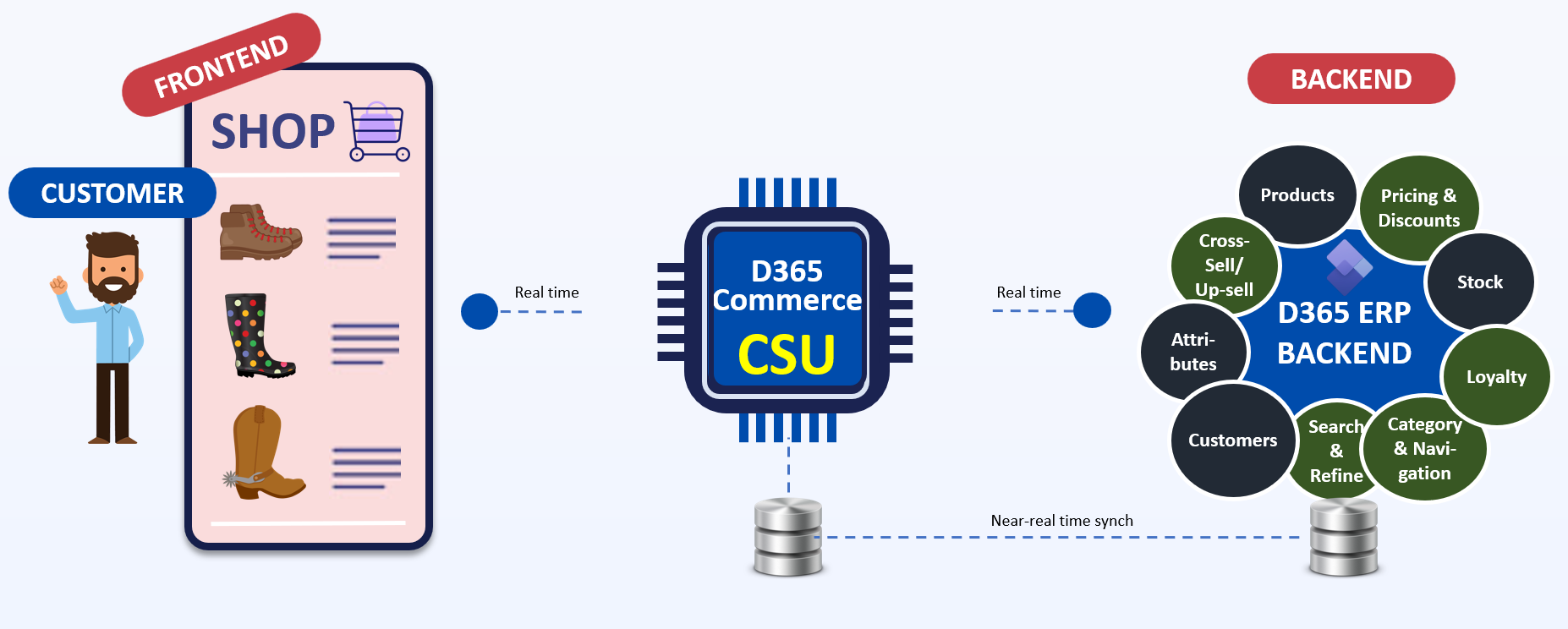
When the Commerce license key, which is included as part of D365 ERP, is enabled, suddenly way more data functionality for your headless e-commerce solution is made availale in ERP (represented by the green balloons in the picture above). The following picture provides a more comprehensive overview of this data and functionality. We’ll briefly discuss the additional functionality and data.
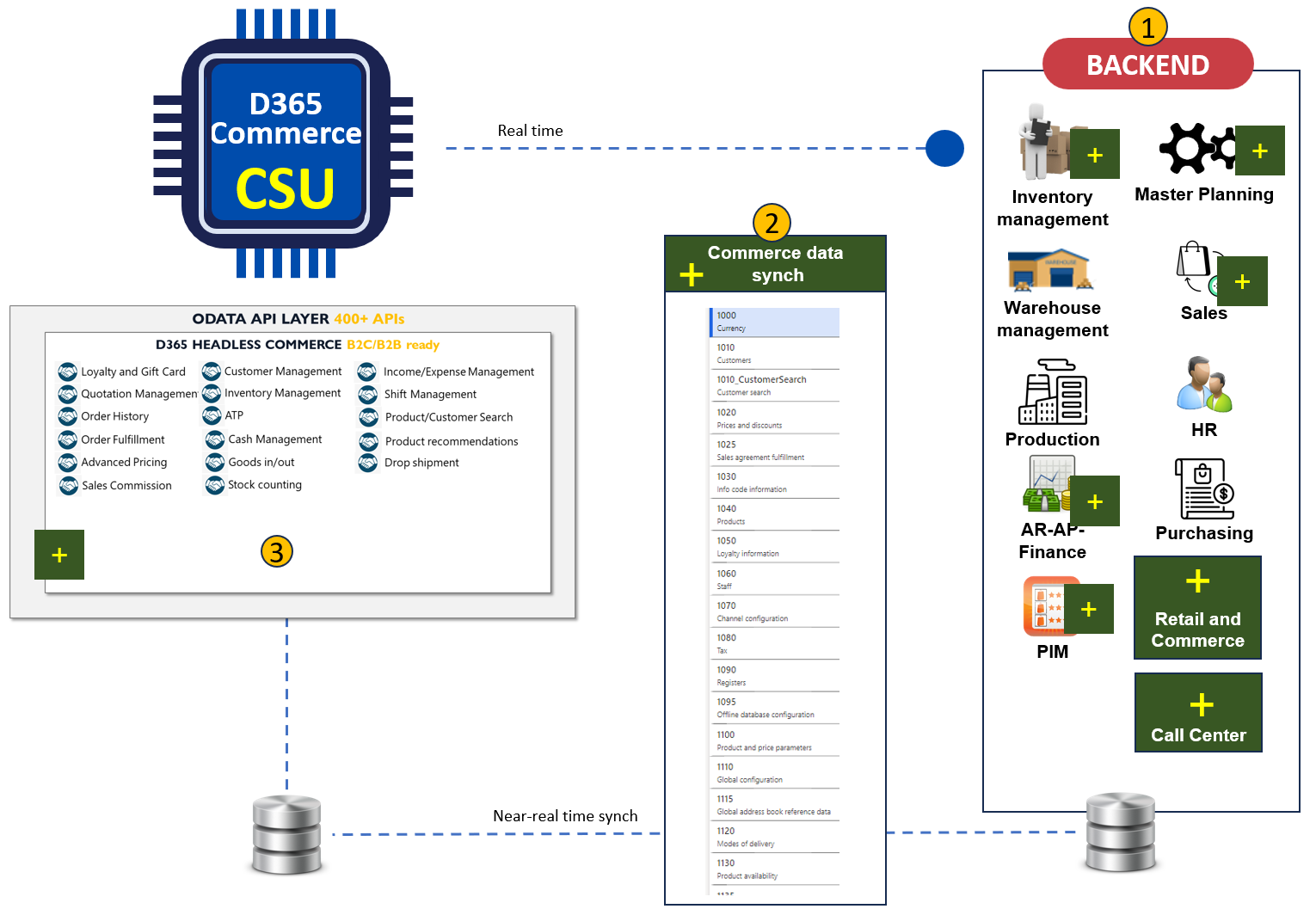
1. Additional Backend functions. In the ERP backend, Commerce oriented functions are suddenly enabled in various modules - Examples:
- omnichannel tokenized payments: link
- Maintaining a navigation hierarchy for your headless frontend: link
- AI powered search in your headless frontend: link
- Item warranty: link
2. Making this functionality and data available. All of this data and functionality can be synched to the Commerce CSU as per an out-of-box synch framework. Data in different areas can be synched with different frequency, depending on required actuality. In many cases, there is also a real time alternative available in case your frontend requires real time data to be presented to the customer. Vice versa, new Orders coming in from the headless frontend are synched from CSU to ERP out-of-box as well.
3. Commerce CSU APIs. Where D365 ERP has an API layer which is mostly Data oriented (to read, write, delete and update data), the Commerce CSU API is packed with Business logic. This means that the CSU APIs can calculate prices, recognizes customer, channel and legal entity context and even integrates out-of-box with various AI functions like Azure AI Search for products and Product Recommendation service.
In upcoming blog posts, I will explain how to benefit from the APIs in a variety of domains such as Inventory management, Pricing Management and Product Management.
Advanced Scenarios
Different Businesses require different setups. And headless e-commerce setups may differ by nature as well. Below we’ll take it one level deeper looking at 3 advanced headless scenarios and how D365 Commerce CSU can support these.
Scenario #1: our Online-only Retailer expands to Asia and Americas
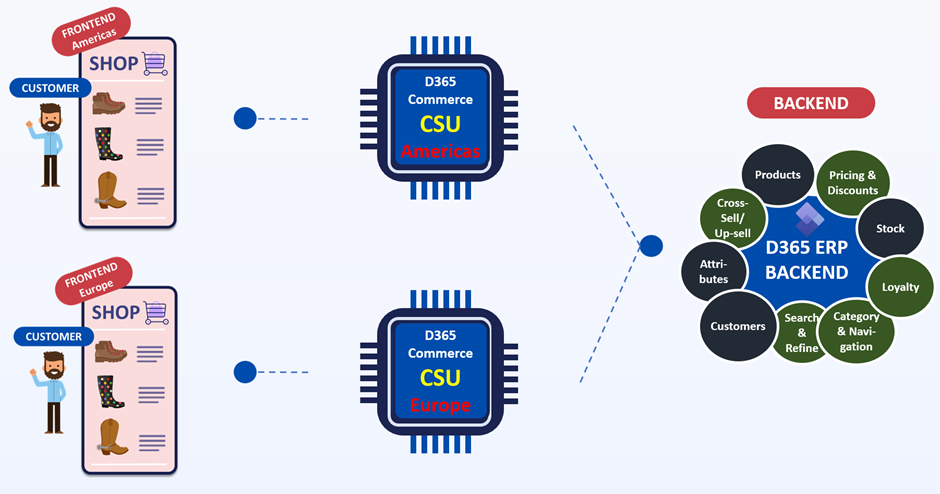
When expanding their Business to the Americas, the Retailers wants to keep latency to a minimum. To accommodate this, multiple CSUs can be deployed. For example, one in Europe and one somewhere in the American region. D365 ERP still allows all data to be synched to both CSUs or the company can make a selection of the data per CSU.
Scenario #2: our Online-only Retailer decides to implement a Progressive Web app
A Progressive Web App (PWA) is a type of web application designed to provide a fast, reliable, and engaging user experience similar to that of native mobile apps, but accessible directly from the browser. To minimize latency, web traffic is to be routed from client to backend API layer directly. But sensitive data should be routed server to server. By utilizing API roles which are embedded in D365 CSU out-of-box, both scenarios can be mitigated: the Customer role is suitable for authenticating an individual shopper. The Application role is suitable for securing server to server communication. We’ll explore both roles in upcoming blog posts in this series.
Scenario #3: our Online-only Retailer requires API performance under 100 ms
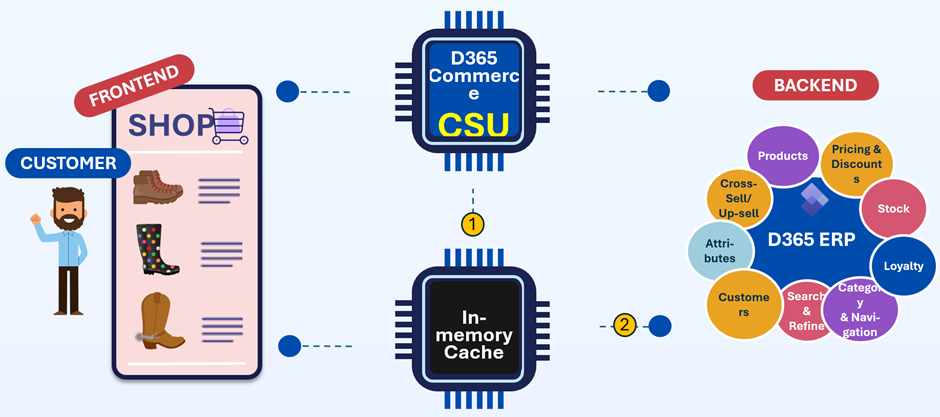
If CSU API performance is not sufficient for some frontend journey components, the customer may choose to implement an in-memory cache. This can either cache CSU requests for quick re-use in subsequent frontend interaction (option 1 in below picture) or can be sourced from D365 ERP by custom batch jobs (option 2 in below picture). This can lead to a hybrid setup where most headless e-commerce components are directly sourced via the Commerce CSU and others indirectly via the in-memory cache.
About the Author
I’ve been integrating non-Microsoft e-commerce solutions with D365 ERP and CRM since the early days of AX for Retail in 2009. Already back in 2015, I connected an E-commerce platform to D365 ERP by a predecessor of the current D365 Commerce CSU for the first time.
Get in touch via patrickmouwen.com/contact if you need help in implementing:
- D365 Commerce on top of ERP including D365 Store Commerce App and D365 e-commerce
- Customizing/Extending D365 Commerce, CSU, Store Commerce App and e-commerce
- B2C and B2B Headless Commerce/D365 ERP integrations via Commerce CSU
- B2C and B2B Commerce Platform/D365 ERP integrations via Commerce CSU
- Customer Service operation based on D365 ERP and D365 CE data utilizing Commerce CSU
- Social Commerce/D365 ERP integrations via Commerce CSU
- Professional App (React.JS)/D365 ERP integrations utilizing Commerce CSU
- POS/ERP integration