
Choosing a pricing API for your webshop? Look beyond pricing
Since version 10.0.47, Dynamics 365 F&O has its own pricing API. If you run a webshop on Dynamics, the obvious next question is whether you can call it directly and skip the Commerce Scale Unit.
Microsoft’s answer is clear: the new API isn’t meant for storefronts, the Scale Unit is. That settles which API to use. It doesn’t settle the business case, because the Scale Unit comes with its own licence.
Whether that licence pays off depends less on pricing than on what else the Scale Unit does for you. First, though, what each option actually calculates.
Two pricing APIs, two jobs
Dynamics 365 has two places that can price a product for an outside system.
The pricing calculation API in F&O is new since version 10.0.47 and runs on top of Unified pricing management. It returns prices and discounts without creating a sales order. Microsoft positions it for low to moderate volume: quoting tools, partner integrations, back-end workflows. Learn says plainly that it isn’t intended to replace the Scale Unit’s pricing APIs, and lists e-commerce and storefront scenarios as not supported.
The Commerce Scale Unit pricing APIs are built for webshops, POS and lots of traffic. One prices a single product for the product page, one prices a set of products bought together, and then there’s the cart itself.
Functionally, the gap is bigger than most people expect. The F&O API gives you a price indication, not a priced order. It returns no charges, such as delivery costs, packaging or a minimum order fee, and no tax. By default it applies only simple discounts. Switch that off and it takes multiline discounts into account too, but Learn still lists basket pricing and promotion concurrency as not supported.
On the Scale Unit, the price check for a set of products handles combination discounts and coupons, but leaves out charges and tax as well. Only the cart calculates the whole order.
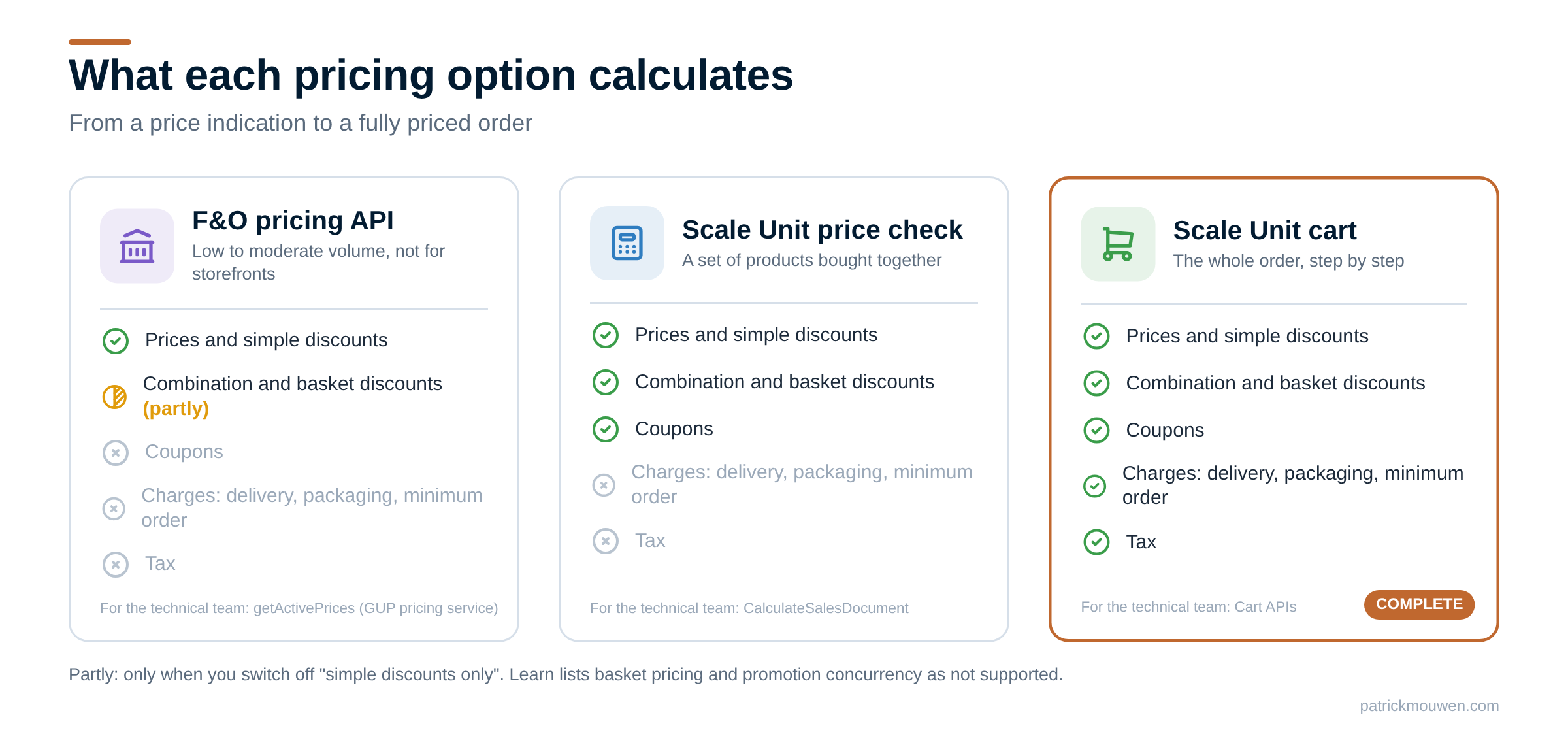
So on pricing alone, the Scale Unit usually wins. The licence is where the decision gets interesting.
For the technical team: the F&O API is getActivePrices in GUPPricingService; on the Scale Unit these are GetActivePrices, CalculateSalesDocument and the cart APIs. See Calculate prices for external systems through the pricing calculation API and Commerce pricing APIs.
One licence, many services
If your own front end calls the Scale Unit, you need the Headless Orchestration licence. You pay for it per month, based on your transaction volume. Buy it only for prices, and the sums are hard to make work.
But the licence doesn’t buy a pricing API. It buys the Scale Unit, and that comes with a lot more as standard: product search and stock, the cart and checkout, quotes and order templates for B2B, order history and invoices after the sale, and customer lookups and addresses. All of it runs on the same rules you already set up in Dynamics.
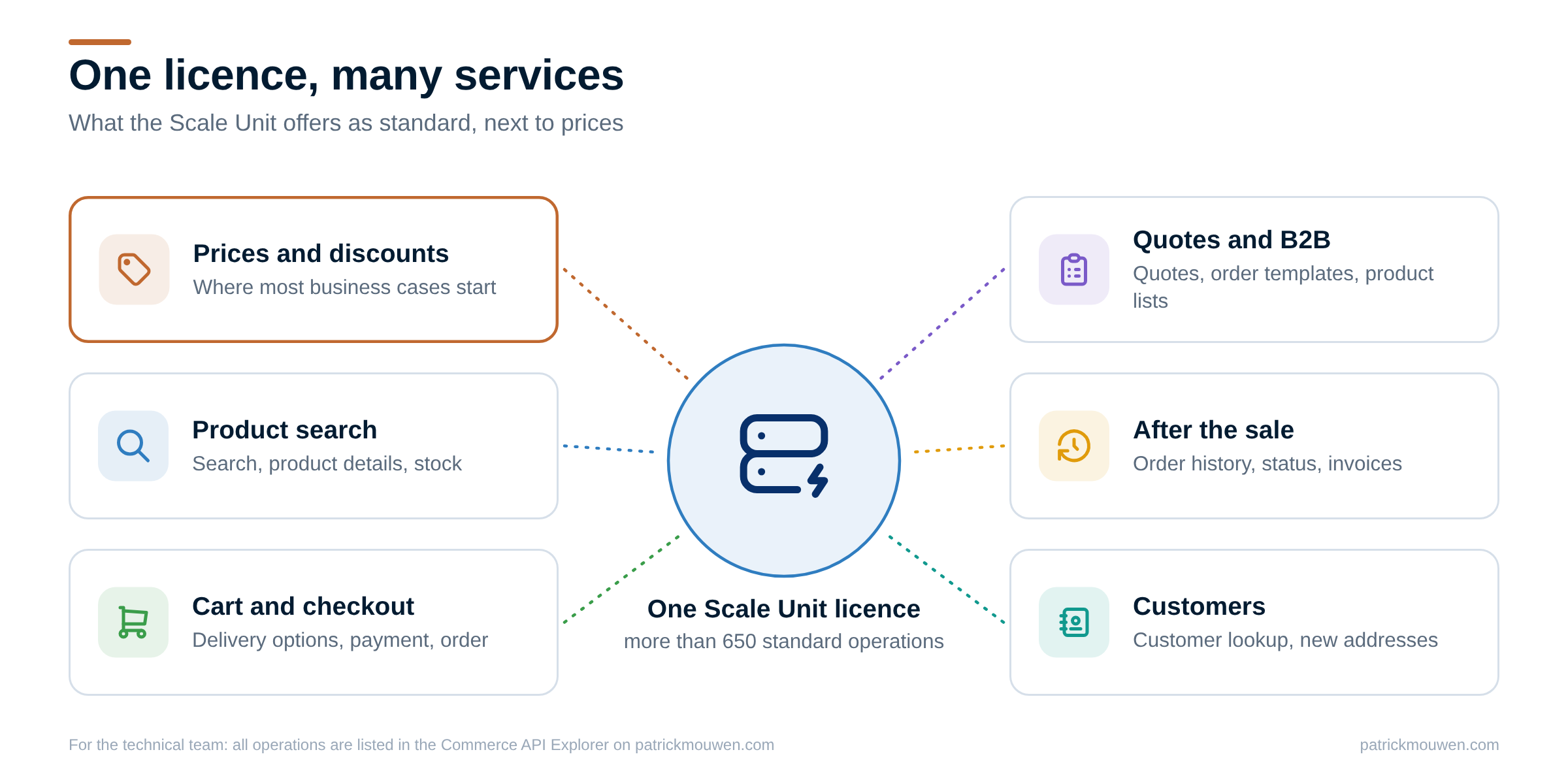
The Commerce API Explorer lists all of them, more than 650 operations, and who may call each one.
And the licence? Microsoft introduced Headless Orchestration in September 2026, for custom and third-party front ends that use the Scale Unit. The Dynamics 365 Licensing Guide lists it under the Headless Commerce add-ons, with a monthly transaction capacity that includes a cloud Scale Unit. Read it together with Microsoft’s announcement, and check with your Microsoft partner what applies to you.
Making the business case work
The licence starts to pay off when more of your work runs through it. In my projects, that usually happens in one of three ways:
- More services in the same webshop. Don’t only ask the Scale Unit for prices. Let it handle search, stock, the cart, quotes and order history too. Every service you take from the Scale Unit is an integration you don’t have to build and maintain yourself.
- More channels on the same services. The same APIs can also serve Dynamics 365 Customer Service, a field sales app or a small app you build for one team. One set of rules, several places to use it. Every channel adds transactions, so check how that fits the capacity you buy.
- One front end for customers and staff. Let your customer service team work in the same front end as your customers, with an employee login. They place orders and quotes on behalf of customers, using the APIs you already pay for. For B2B storefronts, Microsoft describes the setup in Create and configure a Microsoft Entra application for account manager sign-in.
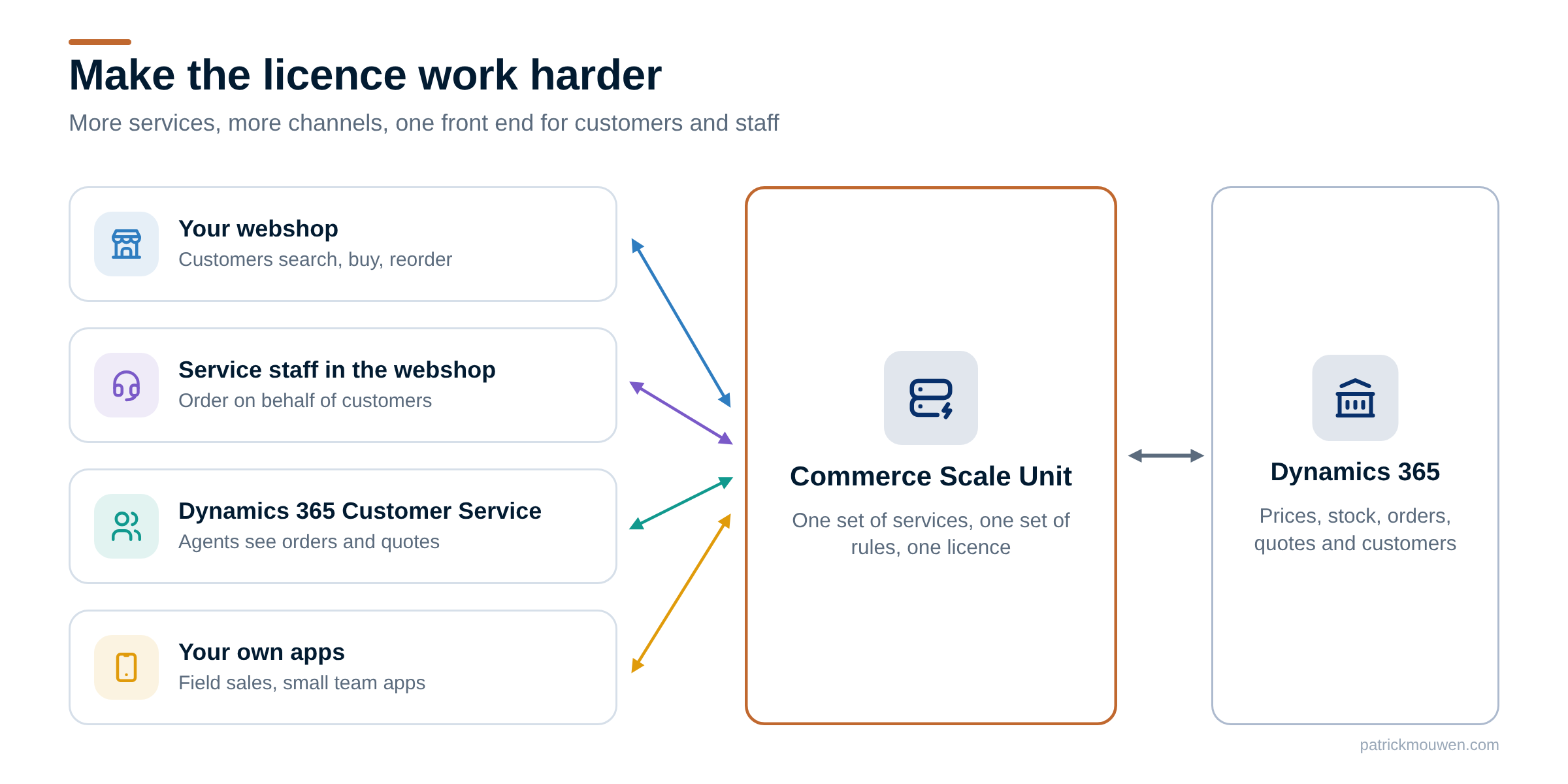
None of these is a must. But comparing the licence with one pricing API rarely tells the whole story. Compare it with everything the Scale Unit can take off your hands.
Have you built a business case for the Scale Unit licence? I’d like to hear which services made it add up for you, or what held it back.
Further reading
| Source | Read | What you'll find |
|---|---|---|
| Microsoft | Calculate prices for external systems through the pricing calculation API | The F&O pricing API, what it supports and what it isn't meant for |
| Microsoft | Commerce pricing APIs | The Scale Unit's price calls for product pages and baskets |
| Microsoft | Composable architecture and new licensing in Dynamics 365 Commerce | The Headless Orchestration licence, announced September 2026 |
| Microsoft | Dynamics 365 Licensing Guide | How the Headless Commerce add-ons are licensed, in the Commerce section |
| Community tool | Commerce API Explorer | All Scale Unit operations, and who may call each one |
| Blog post | Getting Dynamics 365 prices into your webshop | The routes for pricing a webshop through the Scale Unit, charges and VAT included |
| Blog post | Before you buy another Commerce and/or Pricing engine, look at Dynamics 365 CSU | Why one Scale Unit can serve prices to every channel |