
Commerce CSU V9.56/10.0.46 - January 2026
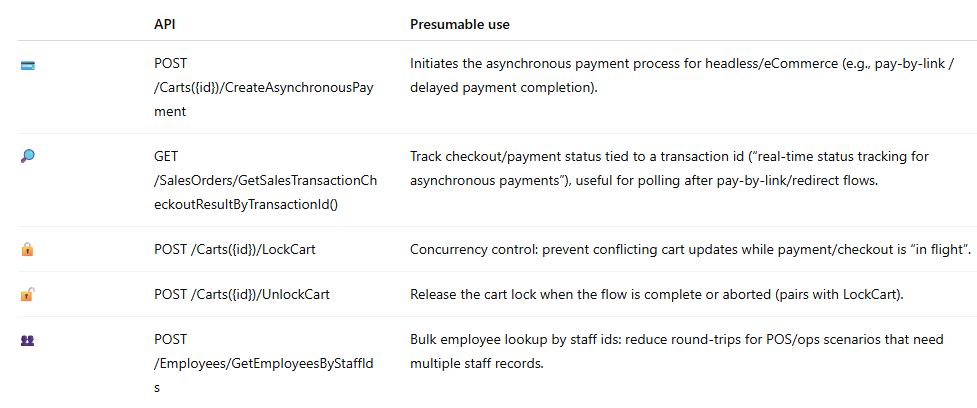
For anyone new in this field: D365 Commerce CSU is shipped as part of D365 ERP. It comes with 650 APIs out of the box which enable the use of ERP and CRM data and business logic in B2C and B2B commerce.
I have been using Commerce CSU for integration scenarios since its early days around 2015. I am sharing my knowledge to enable anyone to use Commerce CSU effectively for their B2C and B2B Commerce applications (e-commerce, POS, Customer Service etc.)
In that context, I am publishing these unofficial D365 Commerce CSU Release Notes with any upcoming new Dynamics 365 ERP and Commerce platform Release.
A-Release Note Details
These release notes are applicable to the following CSU and D365 ERP version:
This release (9.56 / 10.0.46) is a clear step toward more modern, resilient checkout and payment experiences—especially for headless and eCommerce scenarios where payment completion doesn’t always happen instantly.
The biggest shift is the platform maturing around asynchronous payments: think Pay-by-Link, redirect-based flows, and webhook-driven confirmations. The data model now carries clearer indicators of what has been paid, what is still pending, and how payment state should be interpreted during checkout—making it easier to build reliable customer journeys even when the payment outcome arrives later.
Alongside that, there’s a noticeable emphasis on operational robustness. Cart processing gains stronger concurrency safeguards to reduce “double actions” and conflicting updates during payment-in-flight situations—exactly the kind of hardening that matters in high-volume retail and self-checkout patterns.
There are also improvements aimed at traceability and reconciliation in payment-adjacent flows, including richer reference data for third-party gift card scenarios, which helps with auditing, customer support, and recovery when external providers are involved.
Finally, the release includes smaller but meaningful enhancements for store operations efficiency, reducing friction in staff-related workflows and improving performance where bulk lookups are common.
Overall: if you’re building or extending Commerce experiences beyond the standard storefront—especially headless—this version is worth attention because it strengthens the foundation for payment modernization, better observability, and fewer edge-case failures at checkout.
B-Downloads for your convenience
- Latest V9.56 CSU full interface specification in OpenAPI/Swagger format: Link
- Lestest V9.56 Overview of required Commerce Roles for all nearly 800 APIs: Link
C-API and Schema Changes compared to the previous version 9.55/V10.0.45
C.1 New APIs
C.2 Removed APIs
None
C.3 Data Model Changes
1) Asynchronous payments
What changed:
- Cart and SalesOrder payloads gained async-payment-aware totals/flags: AmountPaidWithAsynchronousPayments, IsRequiredAmountPaidInclAsynchronousPayments)
- AsynchronousPayments[] gained new tracking/typing fields (AsynchronousPaymentStatusValue, ExtensibleAsynchronousPaymentTypeValue, ServiceAccountId) plus a default change (AsynchronousPaymentTypeValue 1 → null).
Where it shows up:
- POST /Carts/CreateAsynchronousPayment
- GET /SalesOrders/GetSalesTransactionCheckoutResultByTransactionId
- Many Cart-returning operations now include the same fields
Likely intent. This is the API surface for asynchronous payment support for headless and eCommerce: initiate an async payment (CreateAsynchronousPayment), handle notifications, and track checkout status to completion (GetSalesTransactionCheckoutResultByTransactionId). This is part of the pay-by-link / delayed completion scenarios and automatic cancellation if payment isn’t completed.
2) External gift cards
What changed: Line-level ThirdPartyGiftCardInfo gained TransactionReferenceData and the change appears on CartLine shapes across many cart mutation/read APIs (and any sales-line/order-history shapes that include the same object).
Where it shows up:
- POST /Carts({id})/AddPreprocessedTenderLine
- POST/Carts({id})/UpdateCartLines
- Any Cart-returning operation that returns CartLines repeats the same block
Likely intent: supports external gift cards (provider-integrated) alongside internal gift cards. A new TransactionReferenceData field fits the need to carry provider reference/trace/audit data for reconciliation, customer support, reversals, retries, and “prove what happened” scenarios typical of third-party gift card flows.
3) Payments connector extensibility
What changed: PaymentMerchantInformation gained ConnectorCustomSettings, repeated across endpoints that return Cart.MerchantProperties[] (again, many cart APIs).
Where it shows up: Appears alongside other Cart schema changes in cart-returning endpoints, e.g.
- POST /Carts({id})/OverrideCartLinePrice
- POST/Carts({id})/OverrideCharge
Likely intent: A generic “custom settings” bag is a common pattern to expose connector-specific configuration without forcing new first-class fields per PSP/provider.
C.4 New flight keys
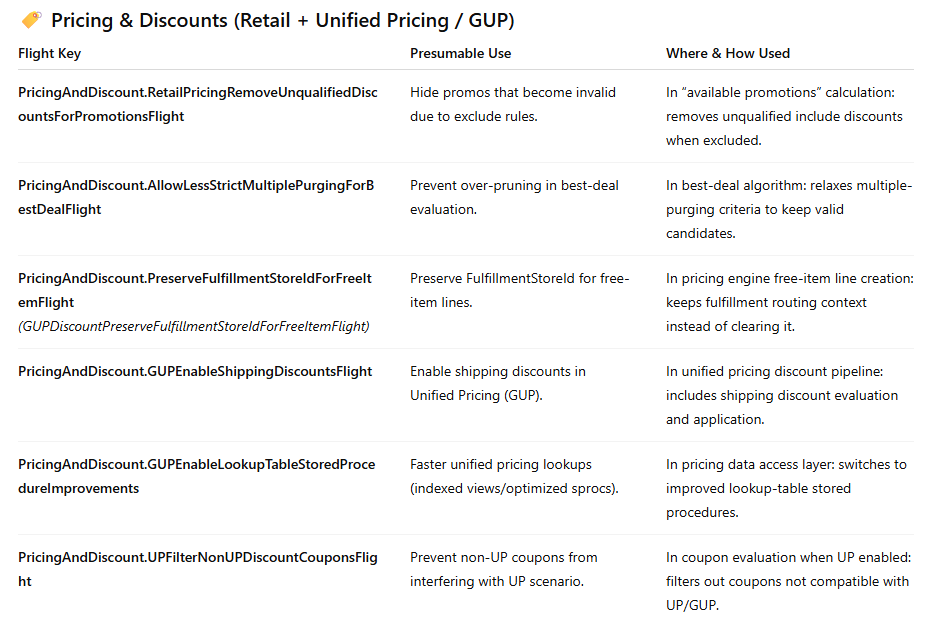
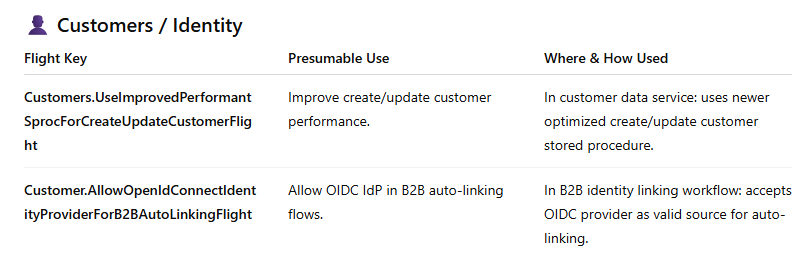
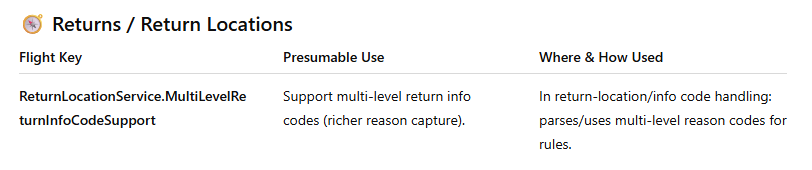
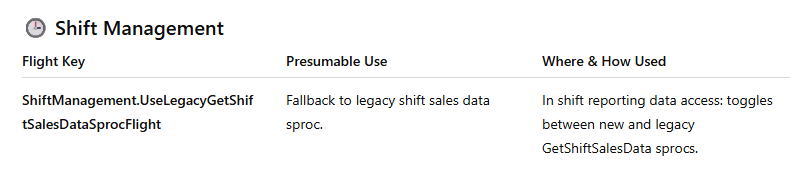
Microsoft implements new CSU flight keys with every new CSU version. These undocumented flight keys steer specific CSU behavior. Here is a list of the latest keys for V9.56/V10.0.46
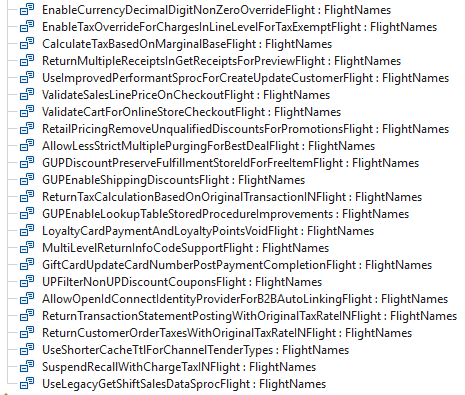
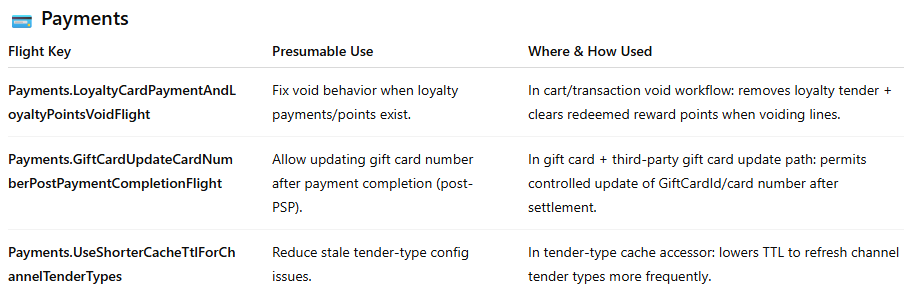
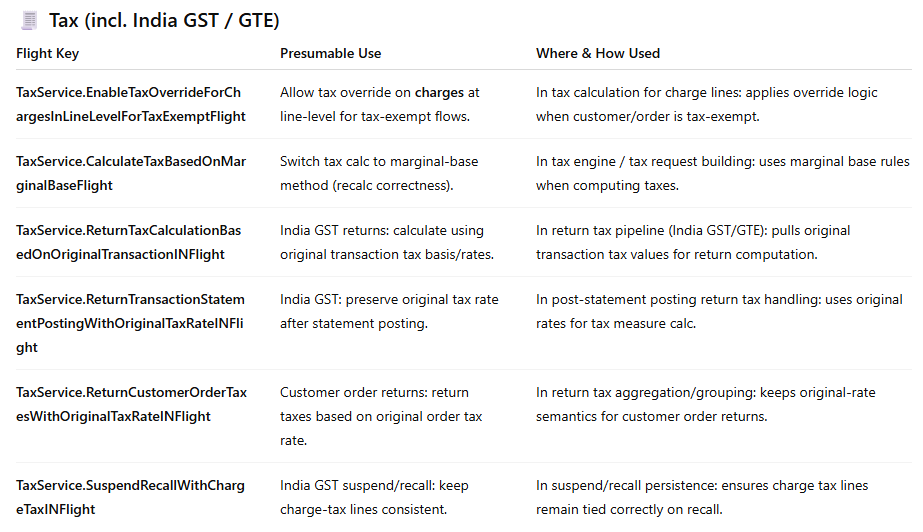
Based on our analysis of the code, the flight keys appear to be used as follows:


Disclaimer
The content of this article represents my independent technical analysis and personal interpretation of publicly available software artefacts. It is not endorsed by, affiliated with, or authorised by Microsoft Corporation. Nothing in this article constitutes official Microsoft documentation, guidance, or product commitments.
All findings are derived from analysis of the software and public documentation. Feature descriptions, presumable use cases, and “likely intent” assessments reflect my professional opinion based on observable code and API changes — they may not reflect Microsoft’s actual design intent, planned behaviour, or final implementation.
Information regarding features described as preview, private preview, or roadmap items is subject to change at Microsoft’s sole discretion and should not be relied upon for planning, purchasing, or architectural decisions. This article describes the product as at the date of publication above.
This article is provided for informational and educational purposes only, on an “as-is” basis without warranties of any kind, express or implied. The author assumes no liability for any direct, indirect, incidental, or consequential damages arising from the use of or reliance on the information contained herein.
For authoritative product information, consult Microsoft’s official documentation at learn.microsoft.com.