
Dual-write everything, or build your own? Finding the middle ground in Dynamics 365

In a Dynamics 365 Commerce programme, the integration between Finance & Operations and Dataverse quietly decides three things nobody put on the steering-committee slide: your storage bill, your reliability, and who gets the 2 a.m. call. “We just dual-write everything” is the most expensive way to decide all three by accident.
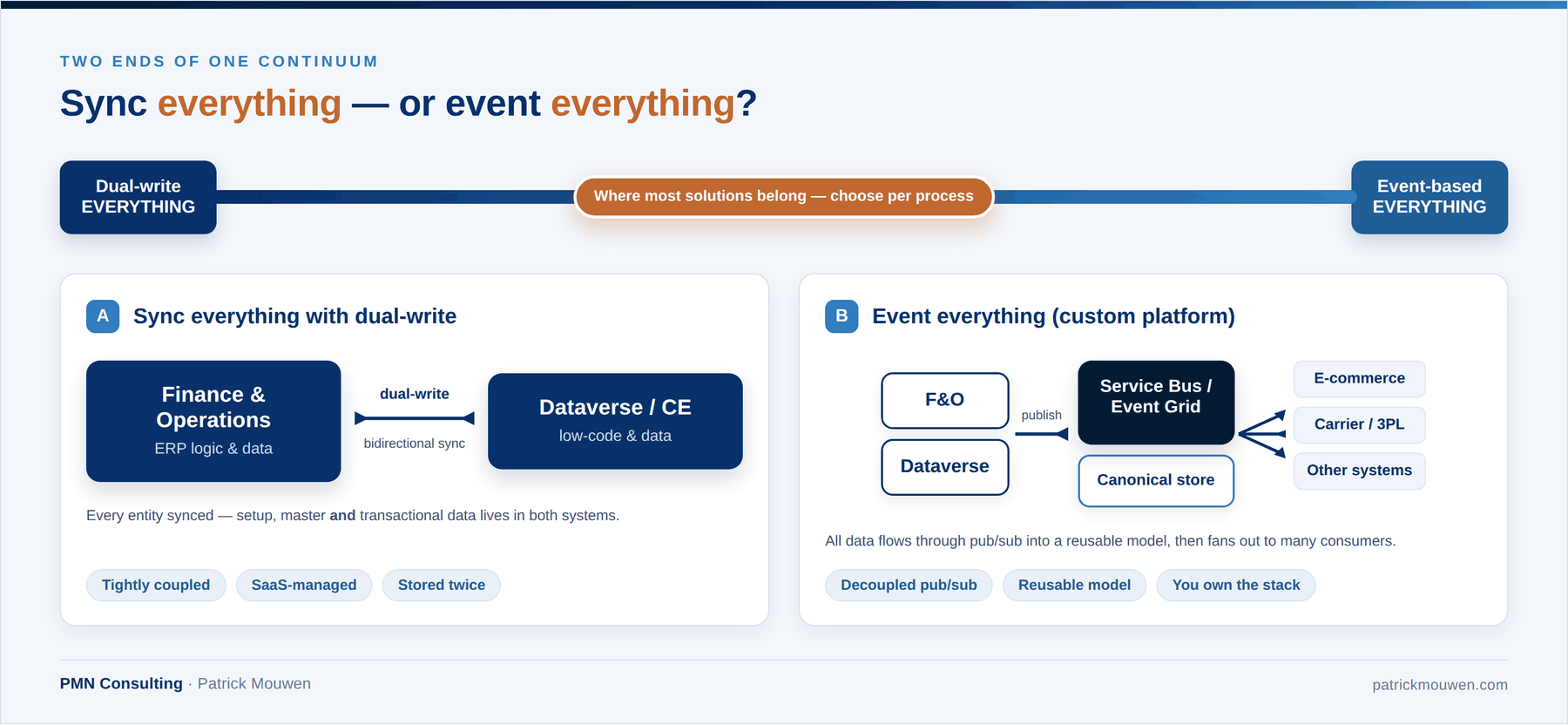
Ask a partner how they’ll keep Finance & Operations and Dataverse in step, and you tend to get one of two confident answers.
One camp says: we dual-write everything. Setup data, master data, transactions — all of it. It’s software-as-a-service, so if something breaks, Microsoft owns it.
The other camp says: we never touch dual-write. Too many surprises. They’ve built their own event-based framework on a large proprietary Azure stack, and everything — setup, master, transactional — runs through it.
In my opinion, the right question to ask is not “dual-write or events?” It’s:
- Which data, for which process, needs which mechanism?
- Does this process require the data to exist in both systems — or does it need access to existing business logic?
That distinction changes the design.
For organisations that live on B2C and B2B commerce, that second question matters more than anywhere else. Sync data between D365 ERP and Dataverse without calling an authoritative service, and you drift from omnichannel into multichannel without anyone deciding to: loyalty rules that differ by channel, the same basket priced differently in the web shop and in customer service. The data is in sync; the answers are not.
What dual-write does and doesn’t do
Dual-write is the data bridge between two systems that have a different purpose.
- D365 ERP (Finance & Operations) is meant to be a closed system: it lives on consistency, reliability, auditability and localisation. That requires a controlled supply-chain and finance loop, with as few unvalidated external integrations as possible.
- Dataverse provides a flexible platform for customer engagement, low-code applications, automation and orchestration.
Dual-write went generally available in March 2020, as part of unifying the two under the Dynamics 365 name, and it does exactly one job: it replicates create, update and delete operations bidirectionally, in near-real-time, so the same record exists on both sides.
What it does not do is share logic. Your price data can be perfectly in sync while the pricing rules that turn it into a quote in CE and an order in F&O quietly diverge.
Why “sync everything” is tricky
Some customers and partners perceive “sync everything” as the safest option. Microsoft offers dual-write as a SaaS solution, so if something goes wrong, we can simply raise a support ticket?
Not really. As part of the SaaS solution, Microsoft is responsible for keeping the infrastructure running — but if records are not synced, resolving that is still customer responsibility.
Enabling “sync everything” carries other potential downsides.
1. It adds a validation layer over your ERP. Without dual-write, an F&O record only has to satisfy F&O. Switch dual-write on, and the same transaction now also has to satisfy whatever lives on the Dataverse side — plugins, custom logic, a bespoke price service the customer-service team built. If CE rejects it, the write can fail even when F&O would happily have committed it.
In a true omnichannel setup that’s fine, because every channel should return the same answer. In the multichannel reality — where CE has grown its own logic — you get errors that make no sense from the ERP’s point of view. You didn’t just add a sync; you added a second gatekeeper on your own database.
There is also a two-minute time limit on dual-write transactions. If custom logic in CE takes too long, writing your e-commerce sales order into D365 ERP can hit that limit. Both symptoms look the same from the ERP side: unexplained timeouts and failures when writing orders or posting transactions, on processes that behave perfectly in vanilla D365 ERP.
2. You pay for the same data twice. Store an entity in F&O and sync it to Dataverse and you have stored it twice. Since December 2025, Microsoft pools F&O and Dataverse database storage into one tenant capacity — and Dataverse database storage lists at roughly $40 per GB per month (list price, Tier 1, before discounting). Duplicate a large slice of your setup and master data across both systems — customers, vendors, the related setup tables, order and tax data down to external IDs — and you are not paying once for that gigabyte, you are paying for two.
3. Dual-write is not standard. Dual-write is often presented as an out-of-box solution. Reality is different. I have seen significant extensions to existing maps, and custom maps, in every project. Every mapping — standard or not — needs to be tested as part of running processes. F&O processes that worked when tested within D365 ERP suddenly break during UAT when connected to Dataverse by the real maps. With every new package deployment, regression testing is a must.
4. Bulk is where it bites. Dual-write’s live sync carries real limits — anything over roughly 1,000 records should be split into multiple transactions — and Microsoft itself steers high-volume replication and bulk migration away from dual-write toward other patterns. Community reports across 2024–2026 describe records that silently didn’t arrive, initial-sync failures, and version mismatches taking business processes down; in one write-up, leaving a customer unable to generate invoices. There is an error log and a retry/dismiss flow, so it is recoverable — but recovery is your job.
The alternative: event-based integration
A custom event-based approach can be more robust for the right flows. Publish each ERP or Dataverse change to Azure Service Bus, guarantee delivery with retries and dead-lettering, and both sides converge without a fragile point-to-point coupling. You can shape data into a canonical model, land it in an operational store, and reuse it for any other consumer — an e-commerce platform, a logistics provider, an internal system. For anything that needs to reach beyond D365, this is an interesting pattern.
It carries its own trade-offs. A custom Azure platform that handles everything is something you build, test, operate and own end-to-end. It is often costly to build and to run, and there is no managed service to lean on when something breaks. Building on a partner’s proprietary framework shifts that ownership rather than removing it: the IP sits with the partner. Committing everything to a single custom platform trades one set of trade-offs for another, so it deserves the same scrutiny as “dual-write everything”.
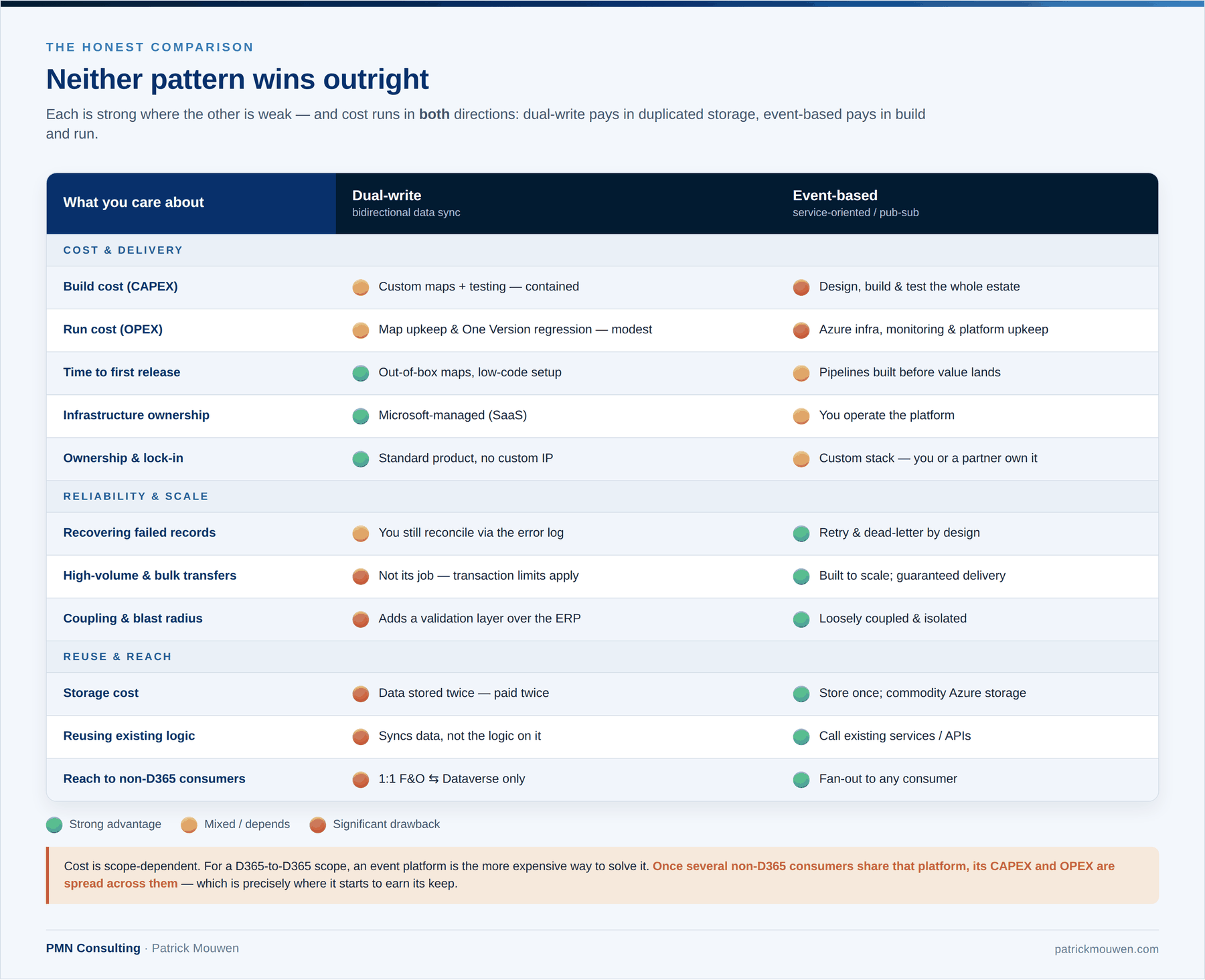
Read the table below not to crown a winner, but to see how the strengths interleave. Dual-write leads on speed, managed infrastructure and having no custom IP to maintain. Event-based leads on scale, storage, reuse, coupling and reach. When both patterns are strong in different places, the design question becomes where to use each — not which one to standardise on.
My recommendation: a hybrid architecture
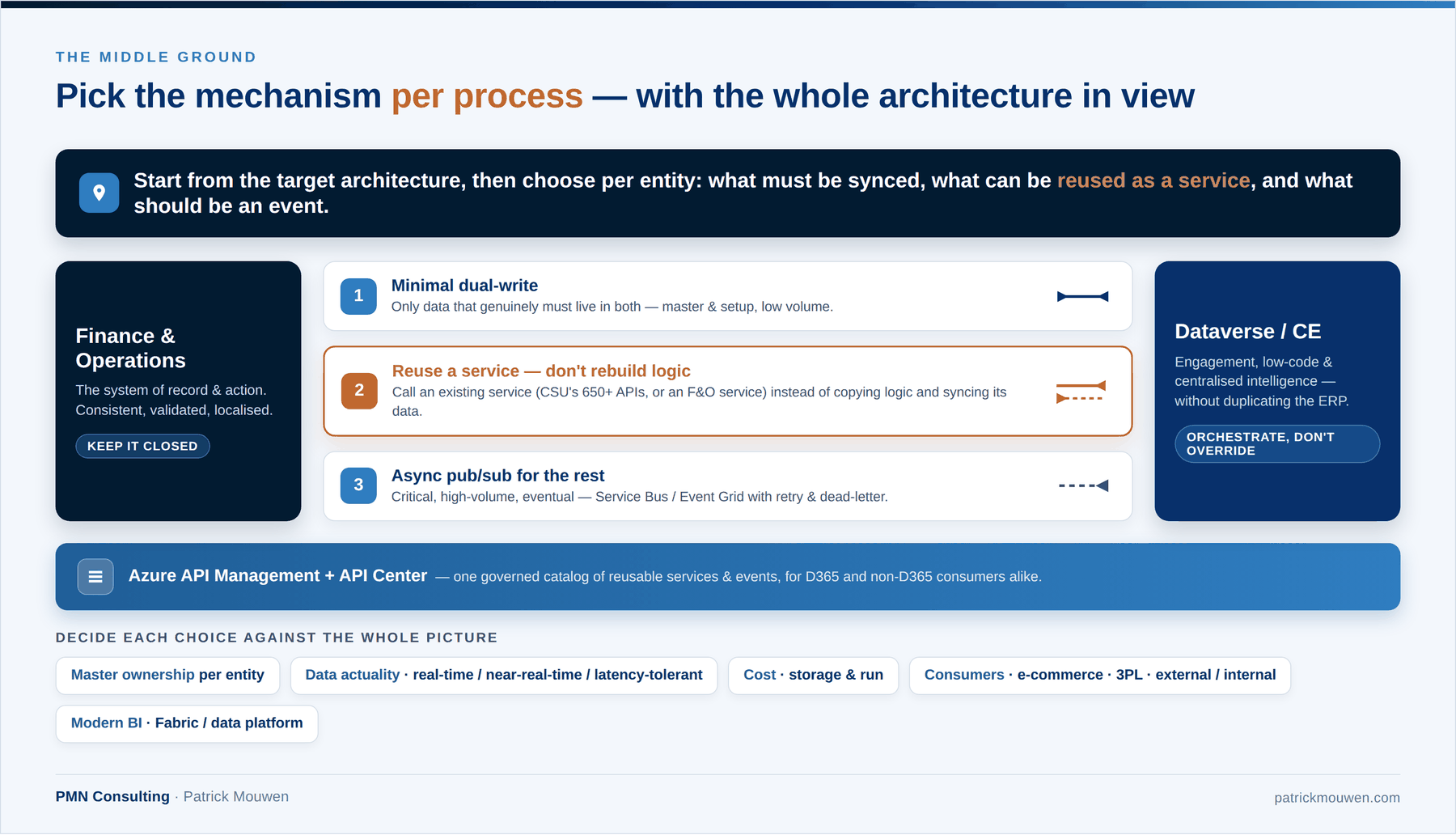
Microsoft’s own platform guidance points toward a hybrid model. Virtual entities, dual-write, business events and data events are described as complementary capabilities, and Microsoft also recommends reducing the amount of data copied between databases as much as possible.
I would add synchronous service reuse and enterprise API management to that model.
The resulting architecture has three primary paths.
1. Selective live synchronisation
- Use dual-write when an operational process genuinely needs the same entity to exist locally in both F&O and Dataverse.
- Good candidates are shared entities with manageable volume, clear ownership, compatible logic and a real requirement for near-real-time consistency.
- Keep the maps close to standard. Every additional entity and extension should have a process-level justification.
- Keep F&O closed: no custom Dataverse logic gating ERP transactions.
2. Real-time service reuse
- Use an API when the consumer needs an immediate answer from authoritative business logic.
- Examples include pricing, availability, credit validation, order submission and calculations that should remain owned by F&O or Commerce rather than being recreated in Dataverse.
- Azure API Management can provide a governed façade for Dynamics and non-Dynamics services across hybrid and multicloud environments. Azure API Center complements it as a design-time inventory for discovering and governing APIs regardless of their type or deployment location.
- This pattern maximises reuse of the product capability you already license.
- If you need pricing in Dataverse, consider calling the engine already running on the Commerce Scale Unit — which ships 650+ APIs and is included once you hold the CSU licence — rather than reimplementing it. If you need a piece of F&O logic in CE, package it as a service and consume it: incorporate the call into the process and write the response into the local CE tables.
3. Asynchronous publish-subscribe
- Use events where the originating process should not wait for every consumer.
- This is particularly relevant when several systems need the same business event, when peak loads require buffering, or when explicit retry, dead-letter and replay mechanisms are required.
- Consider carefully whether analytical data should be a separate concern. Forcing Fabric or another modern BI platform to become an operational integration hub can be very costly if it requires high-frequency data syncs.
Conclusion
Do not begin the dual-write decision with a list of entities.
Begin with the business processes and the wider target architecture. For every process, identify the system of record, the owner of the business logic, the required consistency, the acceptable latency, the expected volume, all internal and external consumers, the failure-recovery requirement and the full operating cost.
Then select the pattern.
- Use dual-write where both applications need local operational data and synchronous consistency provides real business value.
- Use virtual entities where Dataverse needs access without replication.
- Use existing F&O or Commerce services where another application needs the authoritative answer rather than a local copy of the ingredients.
- Use publish-subscribe where the process can be asynchronous, and several consumers, buffering or explicit recovery controls justify the additional integration estate.
Finally, test the hardest process rather than the easiest map. Include peak volume, custom validation, an unavailable consumer, retry, replay and reconciliation in the proof of concept.
The goal is not to move responsibility away from Microsoft, nor to avoid Azure engineering at all costs. It is to maximise the value of the standard platform while introducing custom integration only where it provides a measurable architectural advantage.
Dual-write is an important part of that architecture.
It is not the architecture itself.
Sources and further reading
- Microsoft — Dual-write overview
- Microsoft — Dual-write error management and troubleshooting
- Microsoft — Business events overview
- Microsoft — Virtual entities overview
- Microsoft — Azure Service Bus messaging overview
- Microsoft — Azure API Management
- Microsoft — Azure API Center
- Microsoft — Dataverse capacity and storage
- Before you buy another Commerce and/or Pricing engine, look at Dynamics 365 CSU
- Is there an API-first alternative for dual-write?
- Commerce API Explorer and community tools
Disclaimer
The content of this article represents my independent technical analysis and personal interpretation of publicly available software artefacts and documentation. It is not endorsed by, affiliated with, or authorised by Microsoft Corporation. Nothing in this article constitutes official Microsoft documentation, guidance, or product commitments.
Storage prices, capacity models and licensing terms are indicative, vary by customer and agreement, and change over time. Validate the current Product Terms and your own agreement with Microsoft or your licensing partner before treating any figure here as a basis for a decision.
Information regarding features described as preview is subject to change at Microsoft’s sole discretion and should not be relied upon for planning, purchasing, or architectural decisions. This article describes the product as at the date of publication above.
For authoritative product information, consult Microsoft’s official documentation at learn.microsoft.com.