
Getting Dynamics 365 prices into your webshop
Your webshop has to show the same price your sales team would put on a sales order in Dynamics 365. The obvious idea is to copy all pricing rules to the webshop. It is also the hardest one. This post explains the question behind it, and a simpler way to answer it.
One price, many questions
A webshop needs prices in two places. On the product page, the customer wants to know what one item costs. In the cart, the whole order counts.
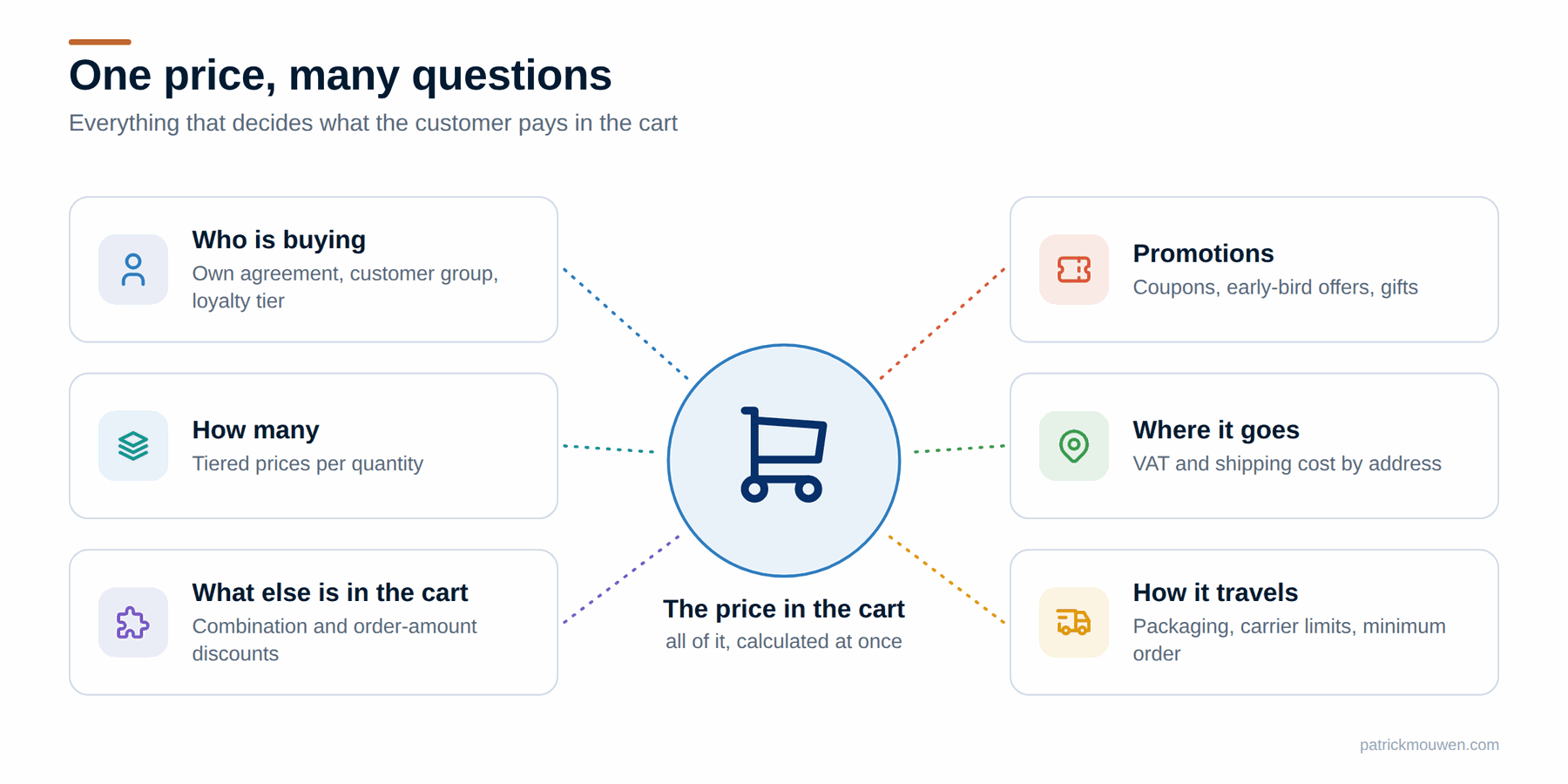
The cart is where it gets hard. The final amount depends on many things at once:
- Who is buying. A consumer sees list prices. A business customer may have its own agreement, a customer group discount or a loyalty tier.
- How many. Tiered prices make each unit cheaper at higher quantities.
- What else is in the cart. Some discounts only apply to a combination of products, or above an order amount.
- Promotions. Early-bird offers, coupons, a gift with purchase.
- Where it goes. The delivery address decides the VAT, and often the shipping cost.
- How it travels. Packaging, parcel size, the carrier’s weight limits, a surcharge below a minimum order value.
You have configured all of this in Dynamics 365 already. So the real question is not “how do I get prices out?” It is: “how do I get the same calculation into my webshop?”
Copy the rules, or ask Dynamics?
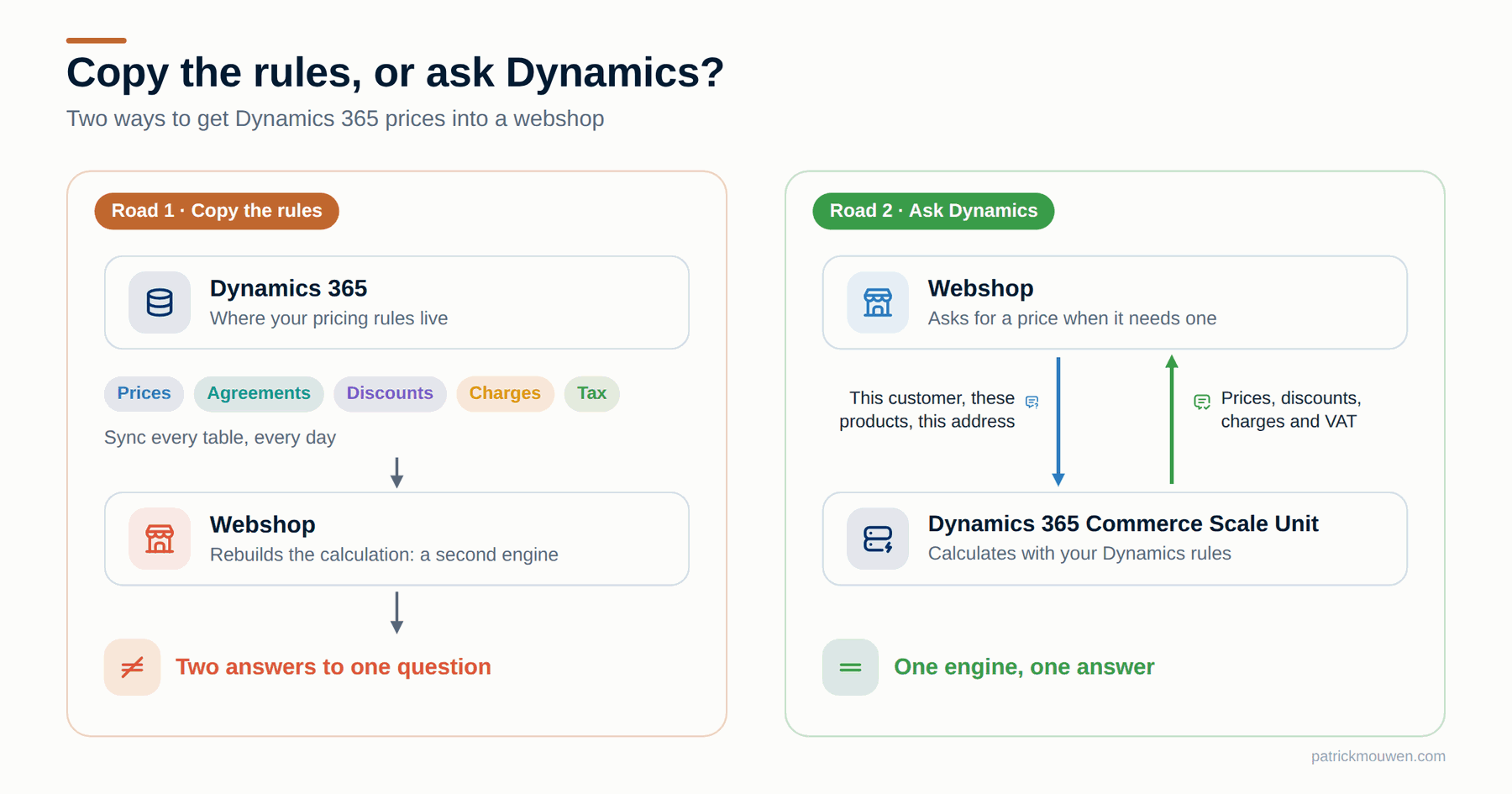
Most teams start by copying. Export prices, trade agreements, discounts and charges, then rebuild the calculation in the webshop.
That road is longer than it looks:
- Many tables to sync. Prices, agreements, discount setups, charge rules, tax setup. Each one needs an interface that keeps running, every day.
- A second pricing engine. The webshop now has to calculate exactly like Dynamics. Every rule, every exception, every priority between discounts.
- Two answers to one question. When the webshop and the sales order in Dynamics differ by a few cents, someone has to explain why. Usually finance.
The other road is to ask. The webshop sends the question: this customer, these products, this address. Dynamics sends back the answer. One engine, one set of rules, one outcome. Call it pricing as a service.
Which part of Dynamics can answer?
Dynamics 365 has two places that can calculate a price on request. They are built for very different jobs.
The pricing API in Finance & Operations. With Unified pricing management, Supply Chain Management offers a pricing calculation API. Microsoft positions it for low to moderate volumes between systems: quoting tools, partner integrations, back-office workflows. It is not meant for webshops, and it returns no charges. The ERP is simply not built for a steady stream of real-time calls from shoppers.
The Commerce Scale Unit. This is the engine Microsoft built for exactly this job. It runs the Dynamics 365 point of sale and Microsoft’s own webshop solution. It already holds your pricing data from Dynamics, applies the same rules, and is designed for many shoppers at once. Microsoft itself points webshops here.
The Scale Unit can answer at three levels:
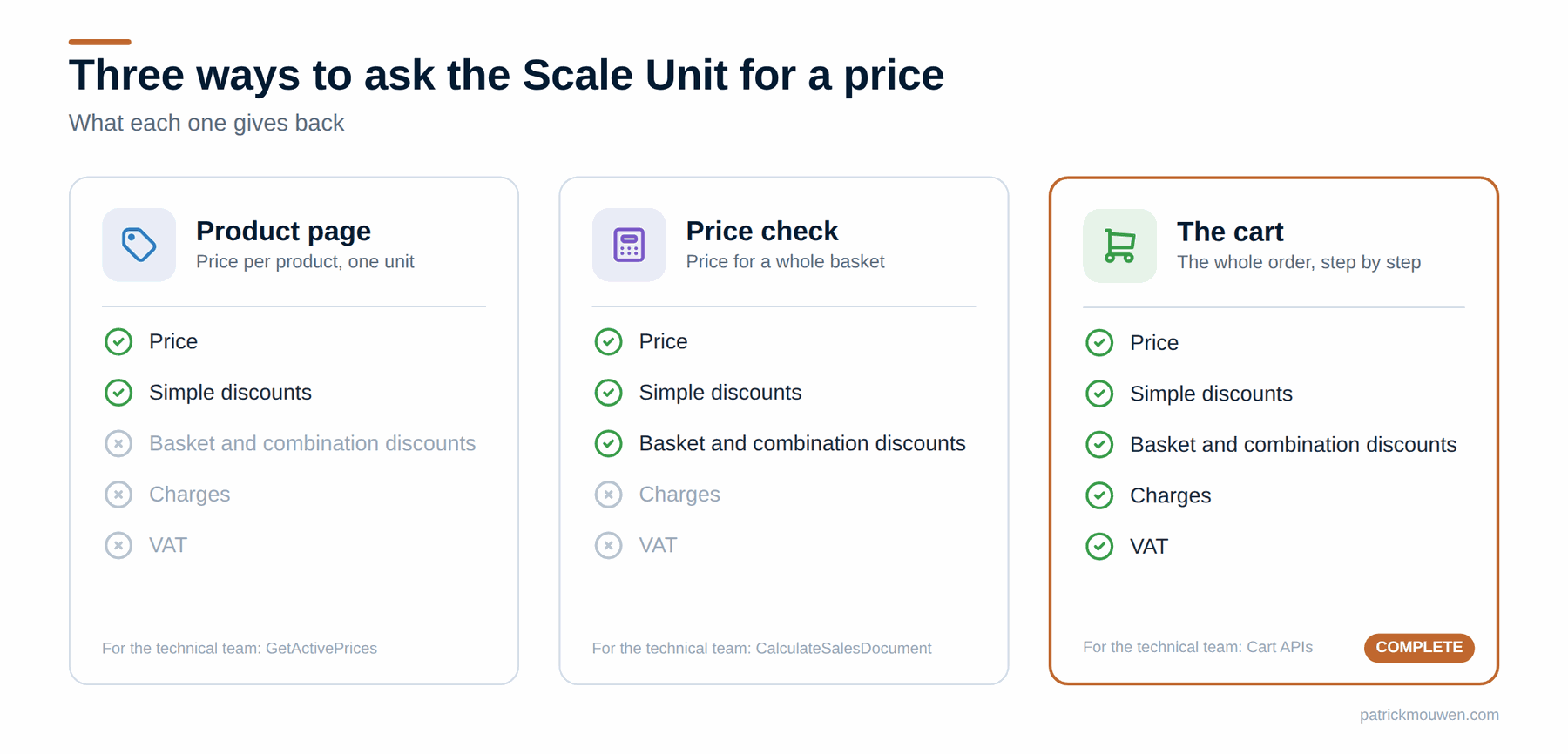
For the technical team, these are GetActivePrices, CalculateSalesDocument and the cart APIs. They are described in Commerce pricing APIs.
And the licence? Since September 2026, Microsoft offers a Headless Orchestration licence for exactly this situation: a custom or third-party client that uses the Scale Unit’s APIs. Read Microsoft’s announcement, and check with your Microsoft partner which licence fits your setup.
Your webshop decides the route
Which level you use depends less on Dynamics and more on your webshop. Picture a line with two ends.
On one end: a packaged platform, such as Shopify or Adobe Commerce. It comes with its own cart, its own checkout and its own price calculation. You are more or less married to it. Many of these platforms are becoming hybrid: they keep their own services, but can call outside ones.
On the other end: a custom front end. Built by you or for you, often called composable. Here you decide which service does what.
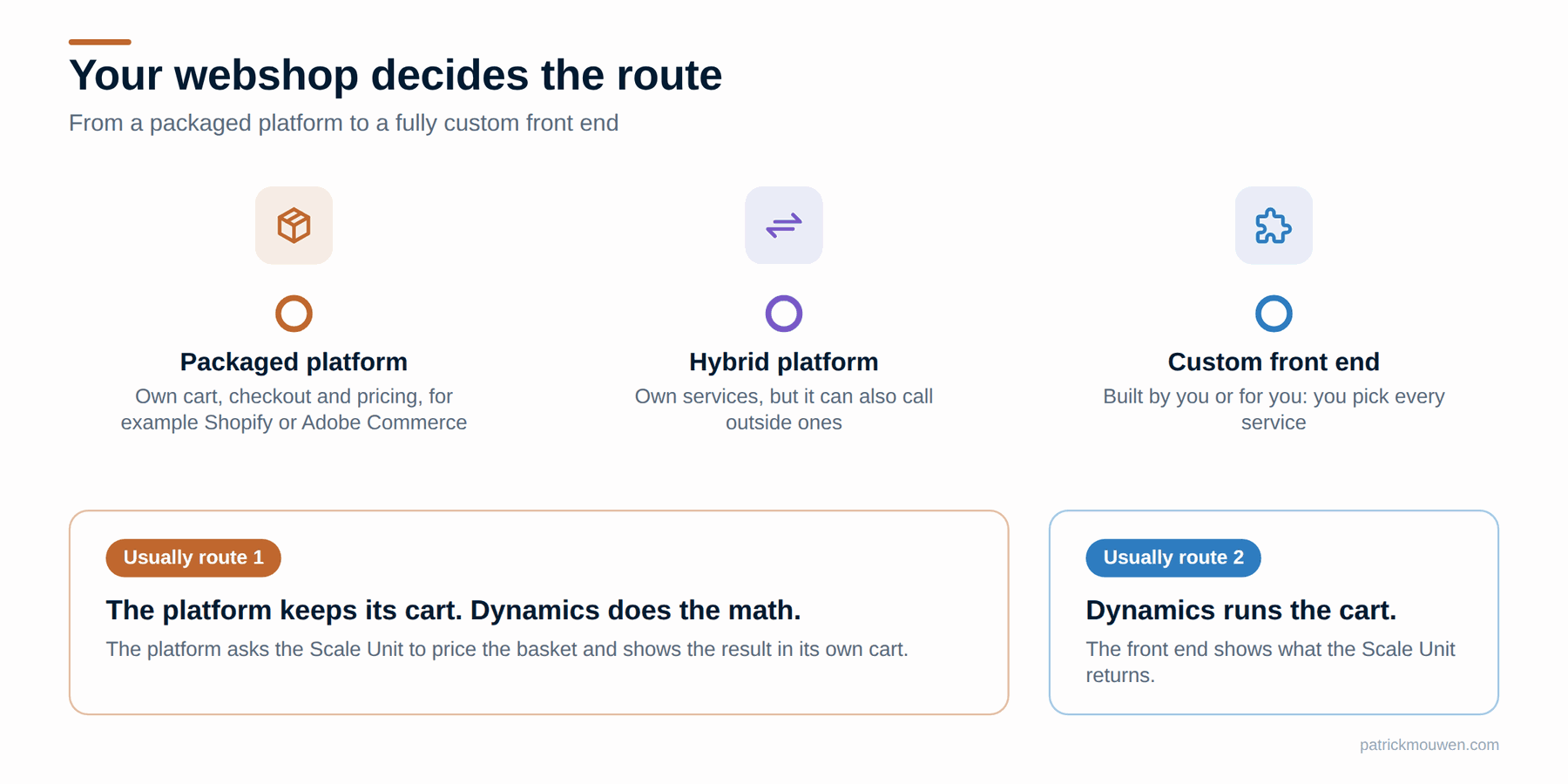
For a packaged platform, two questions decide the route:
- Can the platform hand its whole cart to an outside service? Usually not.
- Can it accept prices, discounts and charges calculated elsewhere into its own cart? Usually yes.
Both ends of the line can use the Dynamics pricing engine. Only the way you plug it in differs.
How it works in practice
That gives two routes.
Route 1: your platform keeps the cart, Dynamics does the math. The platform handles adding and removing items, the delivery address and checkout. Each time the cart changes, it asks the Scale Unit to price the whole basket. It takes what comes back and shows it in its own cart: gross and net prices, discount lines, charges and VAT.
One catch: the standard basket price check leaves out charges and VAT. The fix is small. You combine the Scale Unit’s own cart steps into one call of your own: create a cart, add the lines, set the delivery address, read the result, remove the cart. Microsoft’s services stay untouched; you only add a thin layer around them. The result is a price check that includes charges and VAT.
Route 2: Dynamics runs the cart. The webshop tells the Scale Unit what happens: create a cart, add a line, set the delivery address. After every step, the Scale Unit returns the complete cart, with all prices, discounts, charges and VAT. The webshop only has to show it. For a custom front end, this is the natural choice.
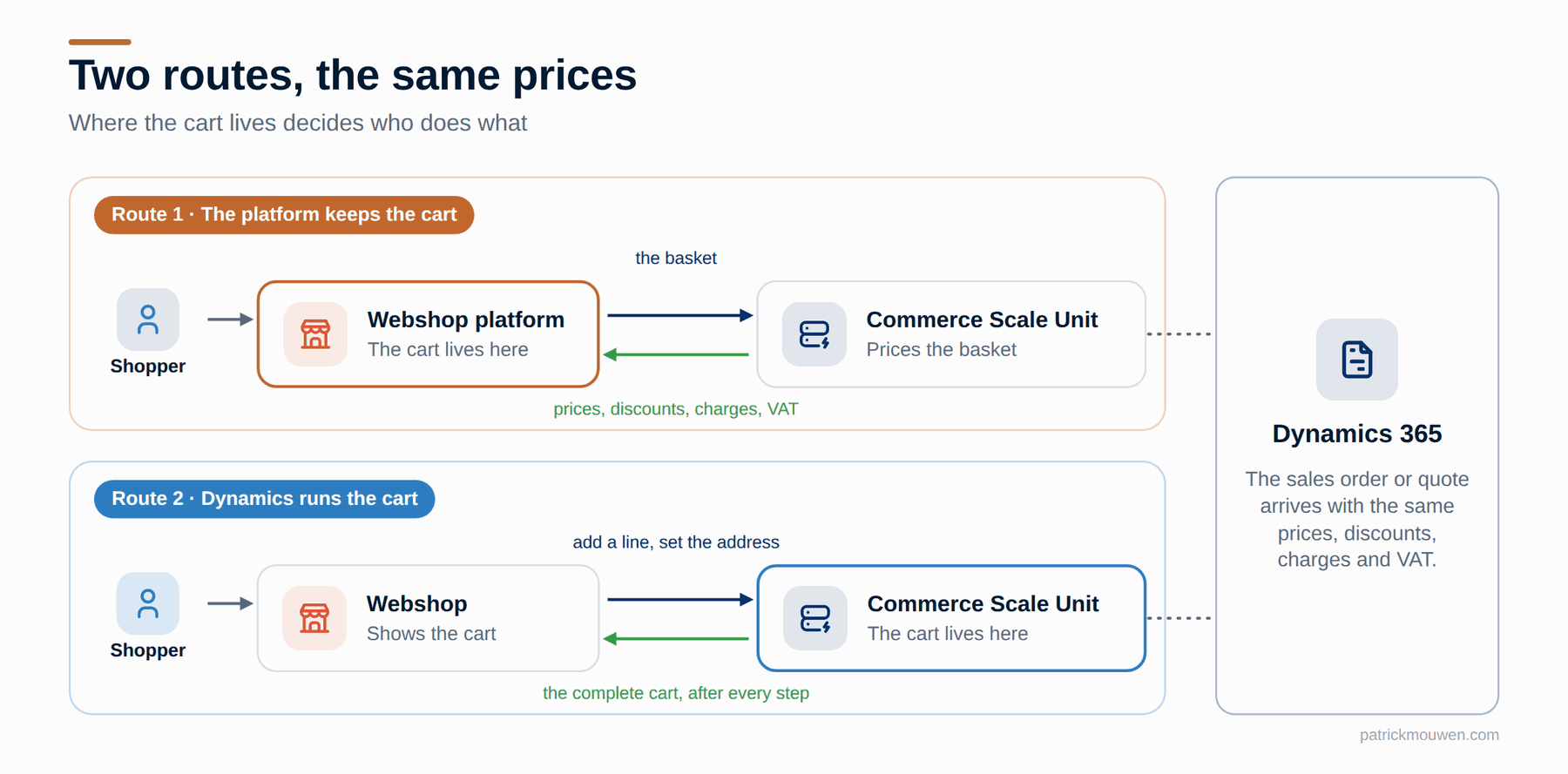
Both routes give the shopper the same amounts that Dynamics would put on a sales order.
Good to know
- Your own charges still fit in. Does your platform choose the carrier itself? It can take the carrier’s rate, add a margin, and put that on the Dynamics cart as an extra charge. The Scale Unit supports adding and overriding charges.
- Automatic charges come from your setup. Handling, packaging or freight charges that you configured as auto charges in Dynamics are applied by the Scale Unit. See omni-channel advanced auto charges.
- The order arrives complete. When the order reaches Dynamics, the prices, discounts, charges and VAT from checkout are on the sales order.
- Quotes work the same way. For the Scale Unit, a quote is just another kind of cart. At checkout you decide: this becomes a quote, or a sales order.
The short version
- Don’t copy your pricing rules into the webshop. Ask Dynamics instead.
- Don’t point a webshop at the Finance & Operations pricing API. It is not built for real-time traffic.
- Use the Commerce Scale Unit as your pricing service, under the Headless Orchestration licence.
- Let your webshop decide the route: a price check per cart change for a packaged platform, the Dynamics cart for a custom front end.
Curious what else the Scale Unit can do? My free Commerce API Explorer lists all its 650+ operations, and who is allowed to call each one.
Are you working on this puzzle yourself? I’d like to hear how you solved it, or where you got stuck.
Sources and further reading
- Composable architecture and new licensing in Dynamics 365 Commerce — the Headless Orchestration and Headless Import licences, announced 15 September 2026.
- Calculate prices for external systems through the pricing calculation API — the Finance & Operations pricing API, and what it is not meant for.
- Commerce pricing APIs — the Scale Unit’s price calls for product pages and baskets.
- Omni-channel advanced auto charges — how automatic charges for handling, packaging and freight are set up.
- Headless commerce architecture — what the Scale Unit is made of.
- Get started with Headless Commerce Integration — Microsoft’s samples for custom storefronts, including pricing.
- Commerce API Explorer — all 650+ Scale Unit operations, and who may call each one.
- Before you buy another Commerce and/or Pricing engine, look at Dynamics 365 CSU — why one Scale Unit can serve prices to every channel.
- Case #1: Can D365 ERP be the backend for your headless e-commerce solution? — can Dynamics be the backend of a headless webshop?
- Case #3: Why using Commerce CSU for headless commerce beats custom-built solutions — the Scale Unit versus building it yourself.
- How can we optimise performance of D365 APIs for use in headless environments? — keeping API calls fast in a headless setup.
Disclaimer
The content of this article represents my independent technical analysis and personal interpretation of publicly available software artefacts and documentation. It is not endorsed by, affiliated with, or authorised by Microsoft Corporation. Nothing in this article constitutes official Microsoft documentation, guidance, or product commitments.
Licensing terms — including the Headless Orchestration licence described above — are indicative, vary by customer and agreement, and change over time. Validate the current Product Terms and your own agreement with Microsoft or your licensing partner before treating anything here as a basis for a decision.
Information regarding features described as preview is subject to change at Microsoft’s sole discretion. This article describes the product as at the date of publication above. For authoritative product information, consult Microsoft’s official documentation at learn.microsoft.com.