
How can we optimize performance of D365 APIs for use in headless environments?
D365 F&O APIs and Dataverse APIs are usually not a great fit for headless environments. Not because they don’t work — but because their performance is often not stable or predictable enough for real-time use cases like:
- Webshops
- Customer service applications
- Custom frontends
- Mobile apps
In many scenarios, response times are simply too slow — or worse — inconsistent. Ironically, this affects not only custom-built apps, but also Microsoft’s own solutions that rely on these APIs, such as D365 e-commerce 🤔.
“But Commerce APIs are designed for this… right?”
Yes — Commerce APIs are the exception.
They are built for:
- high-frequency calls
- carts, pricing, checkout
- POS and online scenarios
But even Commerce APIs can suffer from a familiar problem: ⚠️ After a few minutes of inactivity, performance can suddenly drop — sometimes becoming 3× slower.
Welcome to the world of cold APIs.
⚠️The real challenge: SaaS means limited control
Here’s the uncomfortable truth:
- D365 ERP, Dataverse, and Commerce are SaaS platforms
- We don’t control the infrastructure
- We can barely influence allocated resources
- We cannot “just tune the server”
And then there’s an even bigger issue…
Many APIs don’t just read data — they do things:
- Create orders
- Update addresses
We don’t want to pollute the database just to keep an API warm.
So the question becomes:
✅ How do you keep D365 APIs warm even if they actually mutate data?
🔑Suggested approach for D365 Finance & SCM (ERP)
❌ Avoid using D365 ERP APIs for headless scenarios whenever possible.
✅ Preferred alternatives:
- Use Commerce CSU APIs, or
- Use a custom data cache with a custom API layer that periodically synchronizes with the D365 ERP database (conceptually, this is exactly what Commerce CSU already is — although it contains many APIs with complex business logic).
📊 Before go-live:
- Ensure sufficient telemetry and evidence is in place to properly scale a D365 ERP environment for integrations - This is a fundamental condition for API performance.
- To achieve this, it is strongly recommended to simulate real-life business processes in a Tier-4 / performance test environment
🚦 Prevent throttling and rate-limit issues at all cost**:**
- Carefully distribute data loads across different resources in advance
- Use tools such as Azure API Management (APIM) to shape and control traffic
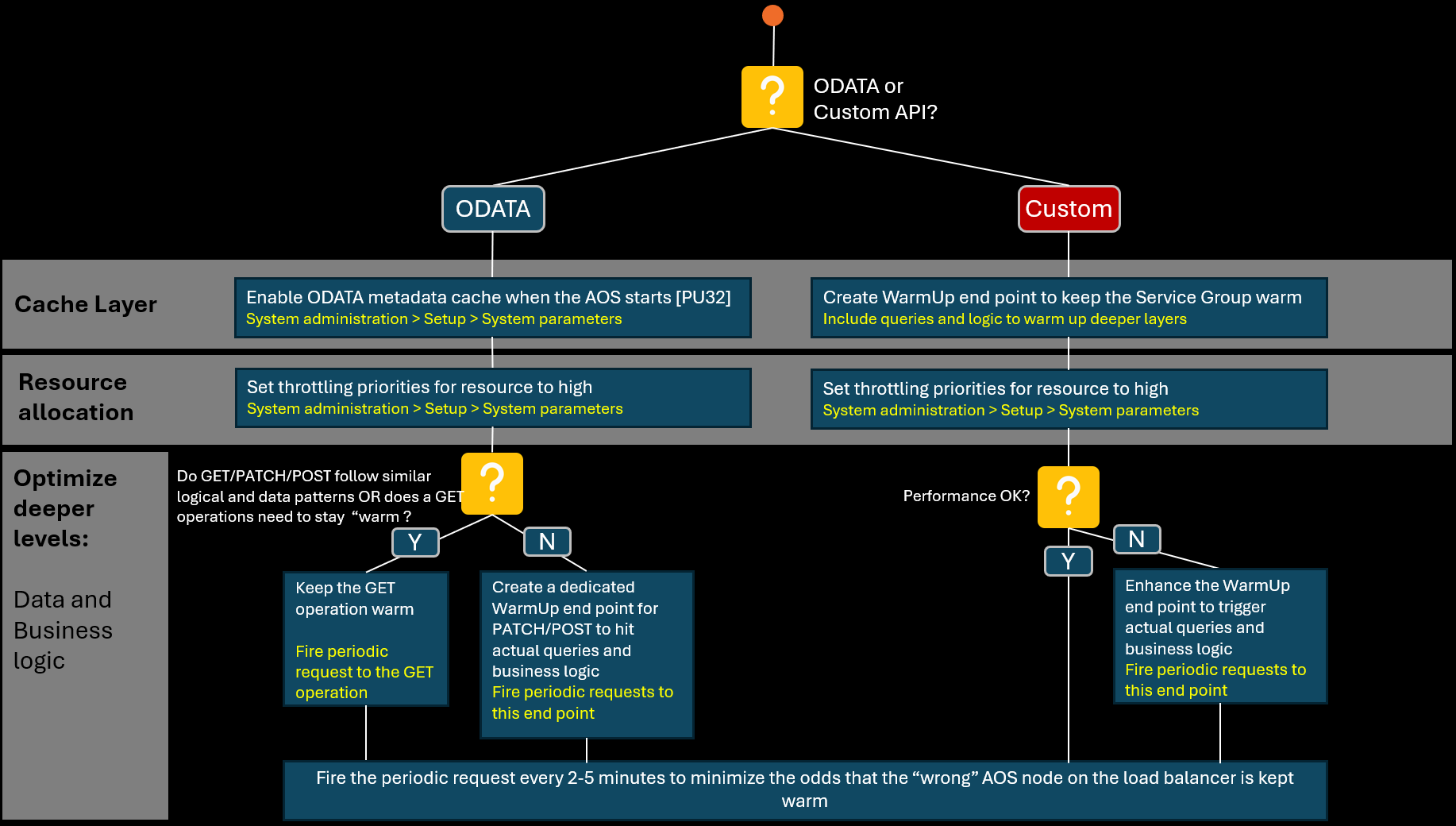
⚙️ If D365 ERP APIs are still required, and the baseline scaling prerequisites have been met by Microsoft, follow the strategy below to maximize API performance. OData APIs and Custom APIs, both require a different approach (see picture below):
✅ For OData end points:
- Enable the OData metadata cache at AOS startup (introduced with PU32) to avoid cold starts to build metadata cache.
- Raise throttling priorities to ensure sufficient resource allocation.
- To keep GET requests warm at deeper levels (Data and Business Logic), leverage periodic requests. Common pitfall here is that a node may be warmed up which is not used for business critical API requests later, so optimize frequency of the “keep warm” requests to avoid this.
- To keep PATCH/POST requests warm at deeper levels (Data and Business Logic), create a dedicated WarmUp endpoint if data access and business logic routes are different than the GET operation for the respective Data Entity.
✅ For Custom end points:
- To keep the caching level warm, Create a WarmUp endpoint to warm up the Service Group (JIT, metadata, caches).
- Raise throttling priorities to ensure sufficient resource allocation.
- If API performance is not sufficient yet, enhance the “WarmUp” endpoint by implementing code to trigger query paths and business logic which is triggered by the actual endpoint as well. Introduce roll back or other patterns to stay as close to the real paths without creating actual data.
- As mentioned before common pitfall with periodc “keep warm” requests is that a node may be warmed up which is not used for business critical API requests later, so optimize frequency of the “keep warm” requests to avoid this.
🔑 Suggested approach for Dataverse: a very different story
Dataverse behaves fundamentally differently from D365 ERP:
- 👉 Metadata is platform-wide cached
- 👉 First calls are rarely significantly slower
- 👉 Performance is often better, but also less predictable
- 👉 Conceptually, there is no real difference between OData and “Custom APIs”
- 👉 Stricter API limits apply
- 👉 “Keep-warm” calls often hurt more than they help
- 👉 No concept of service group warm-up like in ERP
Conclusion: More “SaaS” than D365 ERP, making performance stability harder to enforce and guarantee.
Recommended Dataverse strategy
- 1️⃣ Make plugins cold-start friendly
- 2️⃣ Prefer asynchronous patterns
- 3️⃣ If performance stability is critical:
👉 Introduce a custom staging database (e.g. Cosmos DB) + Expose via a custom API layer on top
🔑 Suggested approach for Commerce CSU
Commerce APIs are already optimized for headless usage — but tuning may still be required.
Best practices
- Scale out with multiple scale units for large implementations (cost increase is often surprisingly modest: ~12–30%)
- Keep Commerce data lean and efficient: avoid the use of catalogs, deeply nested large category structures and unnecessary assortment sizes.
- Prefer IV (Inventory Visibility) over channel-side inventory sync, especially in case of large stock files.
- Reduce synchronous RTS usage via parameterization (use channel db to HQ synch patterns instead)
Warming strategies
- Slow GETs → one periodic “keep warm” request every ~10 minutes is often enough
- Many nodes? Similar issue as we saw with D365 ERP → Increase frequency to 2–5 minutes
- Slow POSTs? 👉 Last resort: custom warm-up endpoints that touch deeper CRT and data layers used by the real operation
🔑 Your low-code helper: the “keep-warm” Logic App
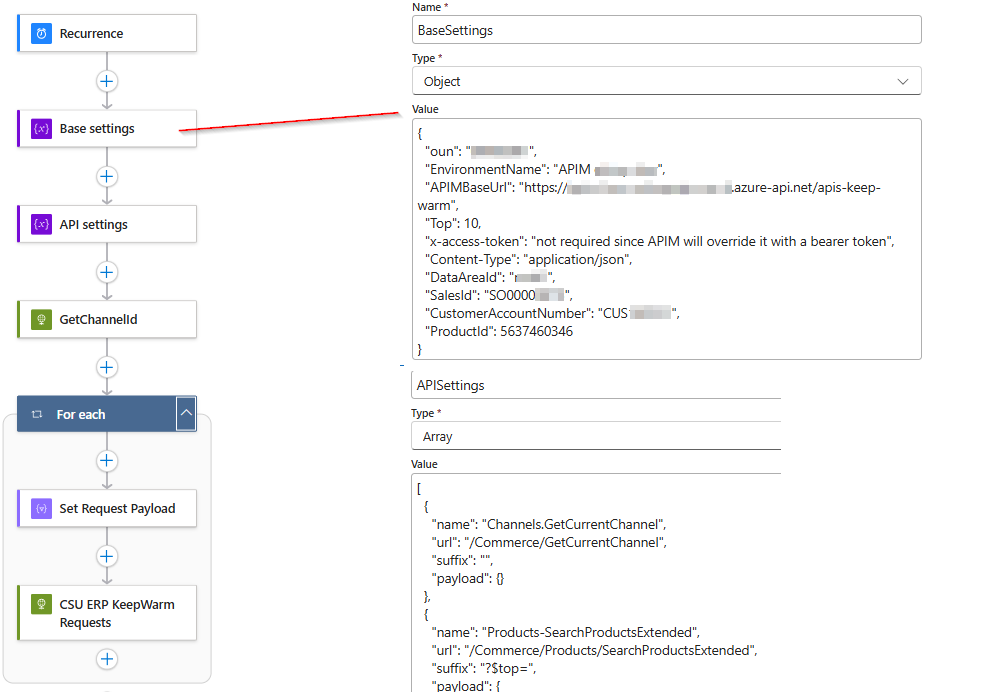
If the performance of your D365 ERP and Commerce APIs can be sufficiently improved by keeping the API warm through periodically triggering an endpoint—either directly or indirectly via a “WarmUp” endpoint—it can be very useful to implement this using a Logic App.
First, because it is an easy-to-maintain and easy-to-understand low-code solution, and second, because it is simple to configure:
1️⃣ Recurrence can be configured directly in the Logic App
2️⃣ If the Logic App interacts with endpoints that are abstracted through Azure API Management, you can avoid using service connections altogether — making the Logic App easy to deploy and move between environments
3️⃣ Sample payloads can be maintained externally, for example in files or storage accounts, and reused by the Logic App (effectively decoupling data from logic)
Below is an example of such a Logic App:
Final thought — and an open question
I’m convinced many people in the D365 community have great ideas and best practices around this topic.
👉 How do you handle API performance in headless scenarios? 👉 What patterns have worked — or failed — for you?
Let’s share experiences.