
Keep Dynamics 365 F&O standard. But where should the business logic live?
“Keep F&O standard.” I agree with that principle.
But I’ve seen it taken quite far. Functionality that already exists in Finance & Operations ends up in Dynamics 365 CE, surrounded by integrations and copies of ERP data, partly because nobody wants to touch X++.
Now agents are being suggested as another way to close those gaps.
I don’t think the question is whether we can build something outside F&O. Usually we can. The more interesting question is whether moving it actually makes the solution easier to maintain. That’s what I wanted to explore in this article.
Three places to close a gap
No ERP does everything out of the box. When Dynamics 365 F&O doesn’t do what your business needs, there are roughly three places to close the gap:
- Inside the ERP. An extension in X++, the ERP’s own programming language. It runs where your orders, stock and ledger live.
- Next to the ERP, in CE. Dynamics 365 Sales, Customer Service and other apps built on Dataverse, with forms, flows and apps that are often sold as low-code.
- Around the ERP, in an agent. A Copilot Studio agent that reads, decides and then works in the ERP through its tools.
The trend in the community seems to be to treat the ERP as untouchable, and to push every gap to the second or third alternative. Each place is strong at something different, though.
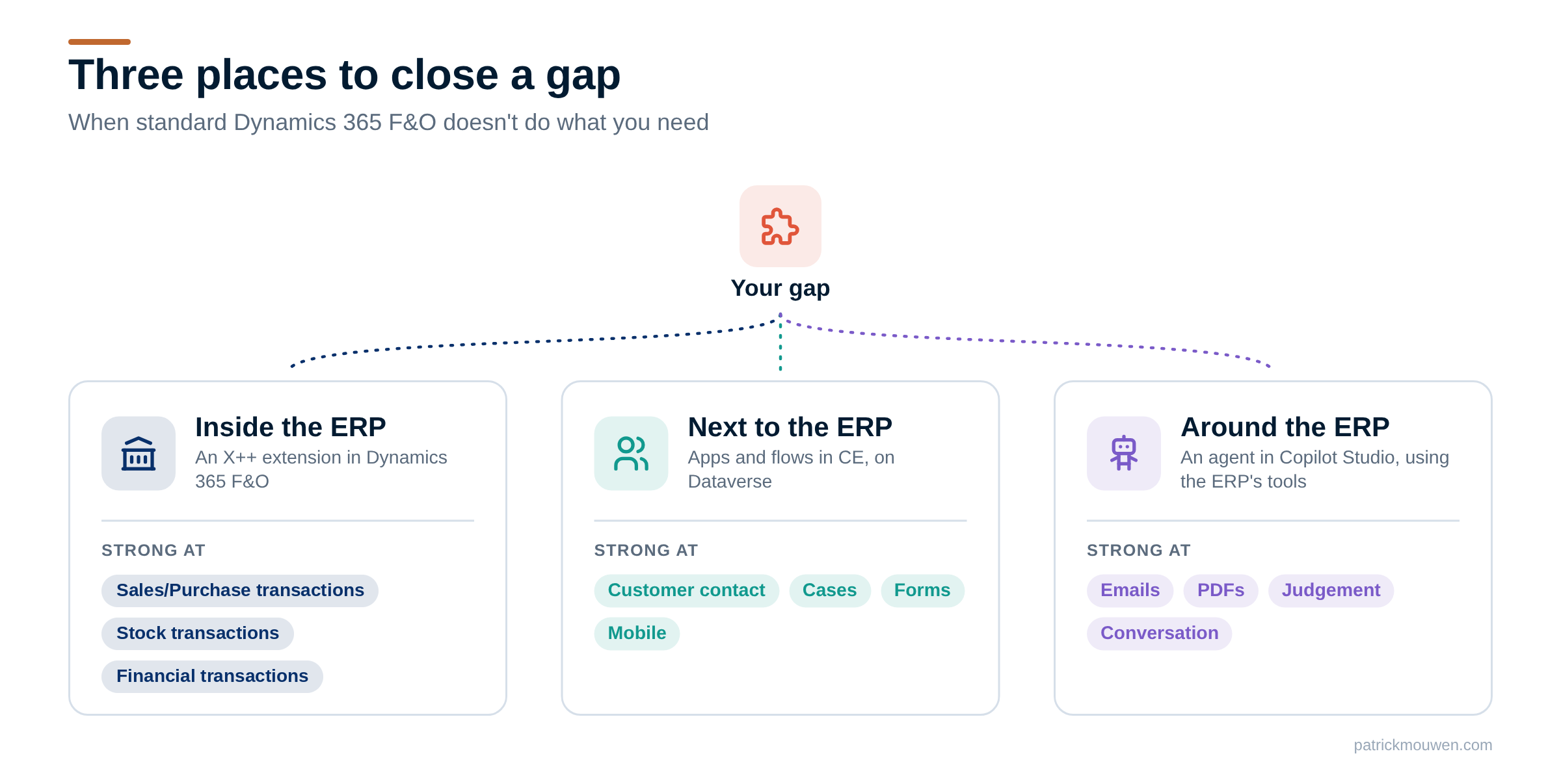
So the real question is not how to avoid touching the ERP. It is: where does this rule need to run to be correct, cheap and safe?
An agent doesn’t fix an ERP gap by itself
An agent can reason about a missing business rule. It can even calculate a result or call an external service. But that doesn’t mean F&O suddenly knows how to process it.
If a rebate requires an accrual, a credit note and an audit trail, those transactions still need to be handled by the systems responsible for them. An agent won’t make that requirement disappear. That’s where I think we sometimes confuse agent capabilities with ERP capabilities.
Bulk work wants a routine. Changing 200 sales orders through forms may take hundreds of tool calls. It also means the agent has to navigate, interpret and execute each step. A dedicated X++ routine gives you much more control over validation, transaction boundaries and error handling. The agent can call it as one action without having to work through every form itself.
The better road combines both. Build the rule as a routine in the ERP. The Dynamics 365 ERP MCP server can offer that routine to agents as one action. The agent decides, the routine executes. Built around D365, executed inside it.
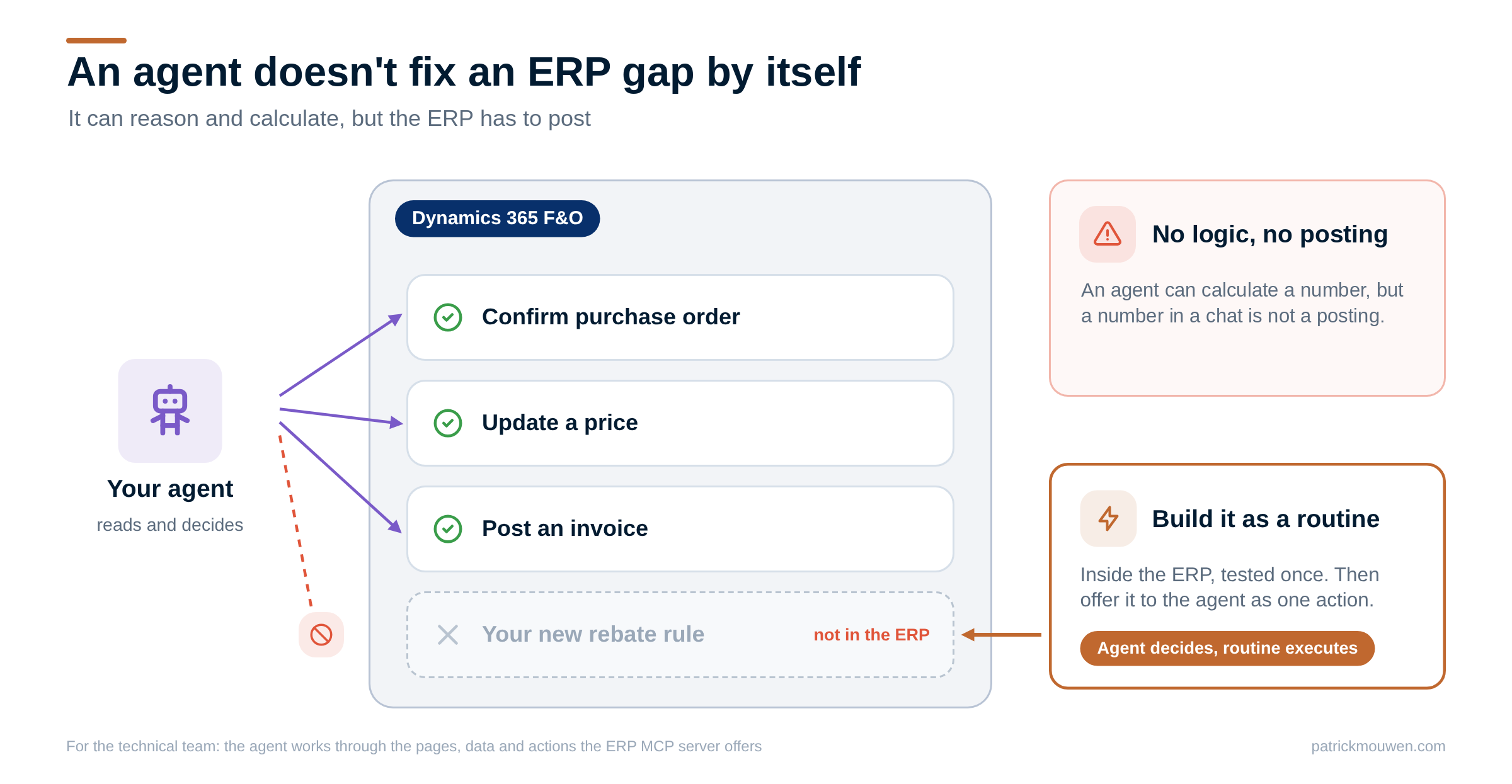
My post What can an AI agent actually do in Dynamics 365 F&O (V49)? explains the three ways agents work with F&O (pages, data and actions), and what Microsoft ships today.
Low-code is still customization
The other half of the trend is low-code. Changes in CE are often sold as low-code, and therefore as safe. Low-code lowers the threshold to build something. It doesn’t automatically lower the responsibility to maintain it.
F&O and Dataverse take different approaches to customization. In F&O, Microsoft ended overlayering with version 8.0. You extend the application through supported extension points, rather than modifying Microsoft’s source code.
Dataverse works with solution layers. When you customize an existing Microsoft component, your changes can take precedence over Microsoft’s configuration. Forms, site maps and model-driven apps have their own merge rules.
Neither approach removes the need for testing. But the difference matters when you’re deciding where to build functionality that may need to survive years of Microsoft updates.
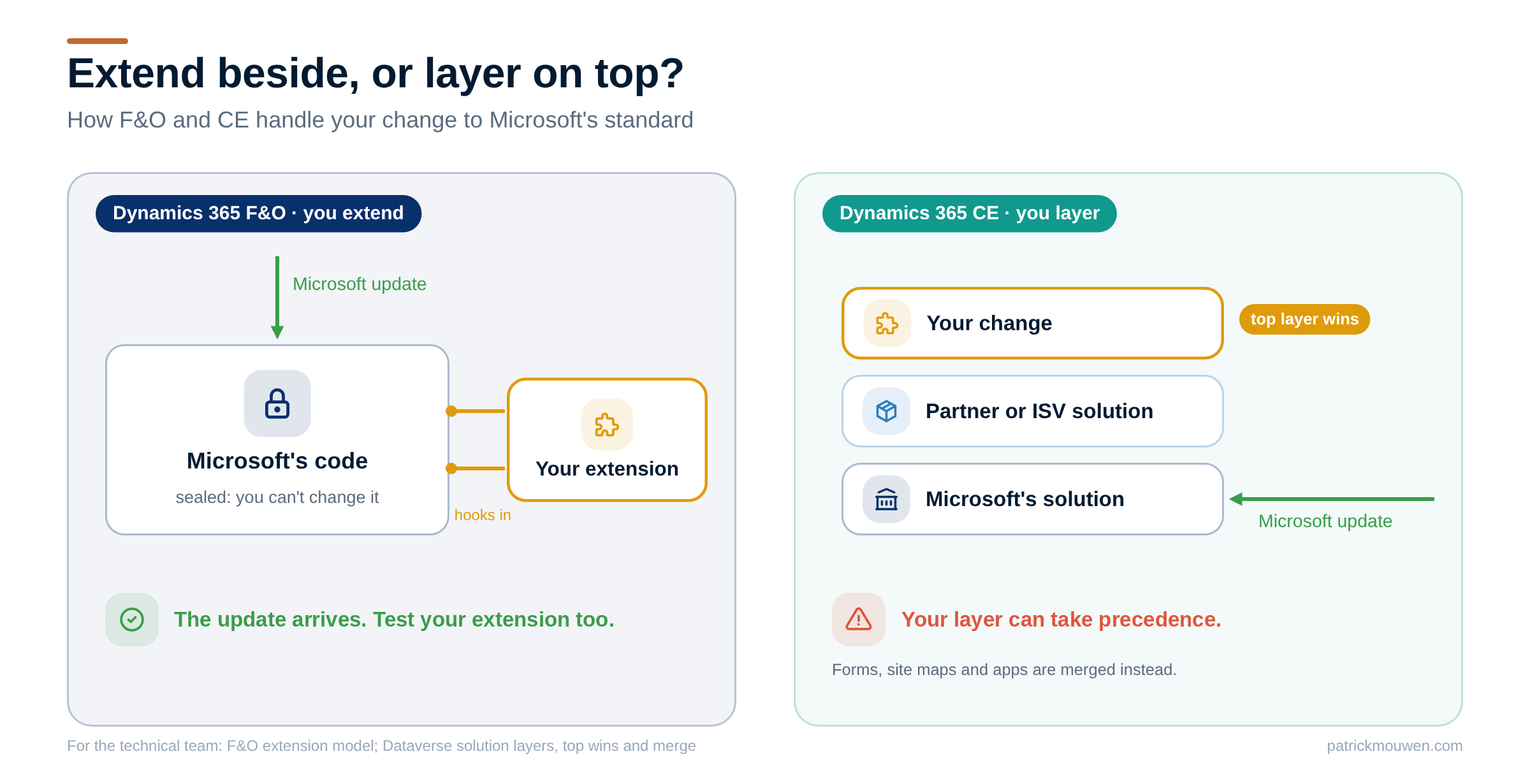
Both can work well for years: your own Dataverse table with a plug-in, or a well-built X++ Chain of Command extension. But both can introduce dependencies that need testing before every update, and CE gets two major updates a year, in April and October, plus weekly service updates.
From practice: CE as a facade. In some projects, I’ve seen CE used as a second user interface on top of F&O. Users work in CE, but the actual orders, customers and transactions still live in the ERP. They quote, order or even manage suppliers in CE. The facade gets its own forms on copies of ERP data, and small gaps in ERP logic are filled in CE. That looks like the lighter road to keep the ERP safe, but it brings new costs and risks:
- Data. The same vendors, customers, products and orders are stored twice, and an often costly integration has to keep them in sync.
- Maintenance. The facade follows CE’s release cycle, the ERP its own, and the integration has to keep up with both.
- Licences. People who work in both often need licences for both, although base and attach licences or existing use rights can change that.
- Change. A new business rule means changing and testing the facade and the ERP together.
- Agents. The ERP MCP server and Microsoft’s ERP agents work on F&O, not on the facade. An agent can also use Dataverse tools, connectors or other MCP servers, but with the data split across two systems it needs extra logic to find the right one to change.
And the integration? A gap closed outside the ERP usually needs ERP data, and often writes back to it. Dual-write copies data between F&O and Dataverse; OData and custom services or business events support other patterns. Virtual tables deserve more attention: through them, a CE app can create, read, update and delete F&O records, with F&O’s own business logic and without a copy in Dataverse. They have limits, such as no Dataverse auditing or rollup columns and no transactions that span a virtual and a native table. So a well-designed CE app doesn’t have to become a second store for ERP master data.
Where should your gap go?
Start by separating three questions that often get mixed up:
- Who owns the business rule? Where does the authoritative definition of the rule live?
- Where should it execute? Which system runs the calculation or the transaction?
- Who needs to interact with it? Through which app or agent do people use it?
The three answers don’t have to be the same system. An account manager can follow a rebate forecast in CE, while the contract handling and the financial processing happen in F&O. In another scenario, a separate domain service runs the calculation and F&O processes the authorised postings.
Which place fits depends less on the technology and more on what the rule does. Four questions sort most gaps:
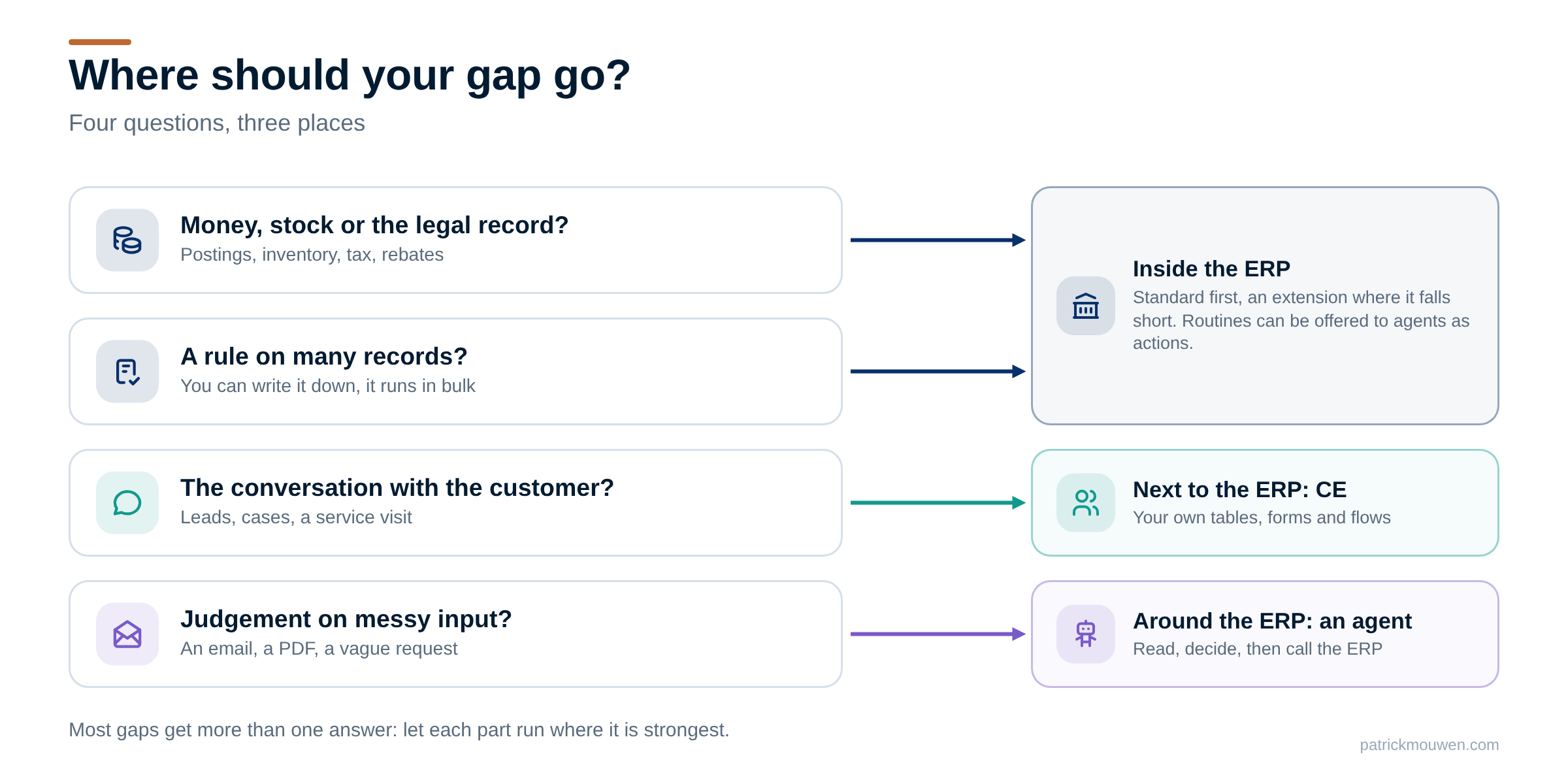
- Does it touch money, stock or the legal record? Postings, inventory, tax, rebates, prices on orders. Then the ERP is the first candidate: the standard feature first, an ISV solution or an extension where the standard falls short.
- Can you write the rule down, and does it run on many records? Then the ERP is the primary place to look, apart from the exceptions described below. Offer the routine to agents as an action if they need to call it.
- Is it about the conversation with the customer? Leads, cases, a service visit, a mobile form. That is CE’s home ground. Prefer your own tables, forms and flows over changing Microsoft’s.
- Does it need judgement on messy input? An email, a PDF, a vague request. That is agent work: read, decide, then call the ERP.
First candidate, not the only one. An ISV solution runs inside F&O too: technically an extension, but built, tested and updated by its vendor, so it can feel more standard. For a very large component, a separate service can use F&O as a black box through its standard interfaces, as Microsoft does with Inventory Visibility. F&O stays standard, but you add a service to run, connect and pay for.
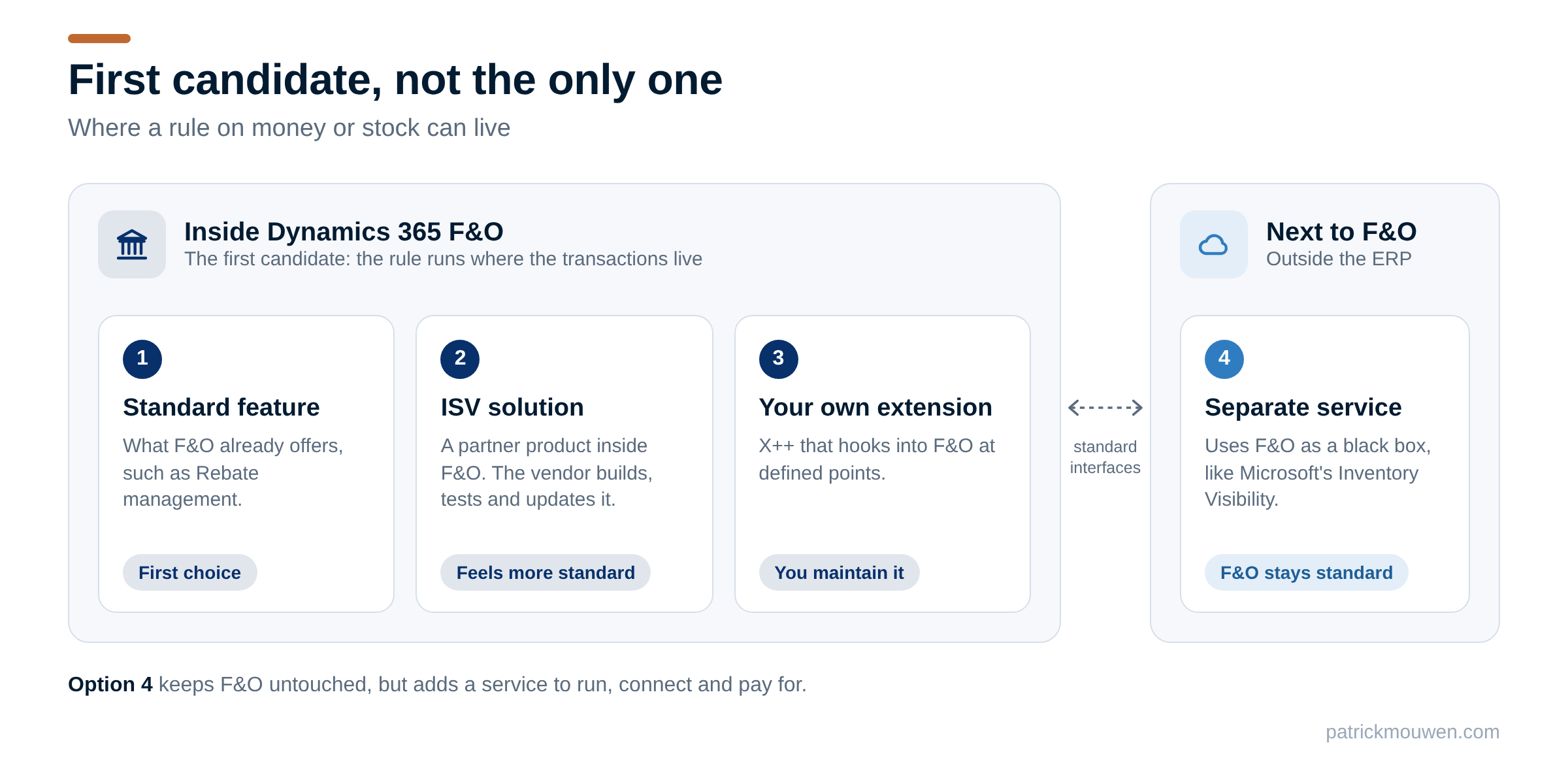
Most gaps get more than one answer. That’s fine: let each part run where it is strongest.
How it works in practice
Take a distributor. It agrees a new rebate scheme with a large customer, and the signed agreement arrives as a PDF.
The agent reads. An agent in Copilot Studio reads the PDF and proposes the deal lines: which products, which periods, which tiers. A sales administrator checks the proposal.
The ERP does the work. The approved deal lives in F&O. The rule runs there: in the standard Rebate management module where it fits, in an X++ extension where it doesn’t. Accruals, credit notes and postings land in the ledger, in one place.
CE shows the result. The account manager sees in CE how close the customer is to the next tier. CE reads that figure from F&O. It doesn’t calculate it again.
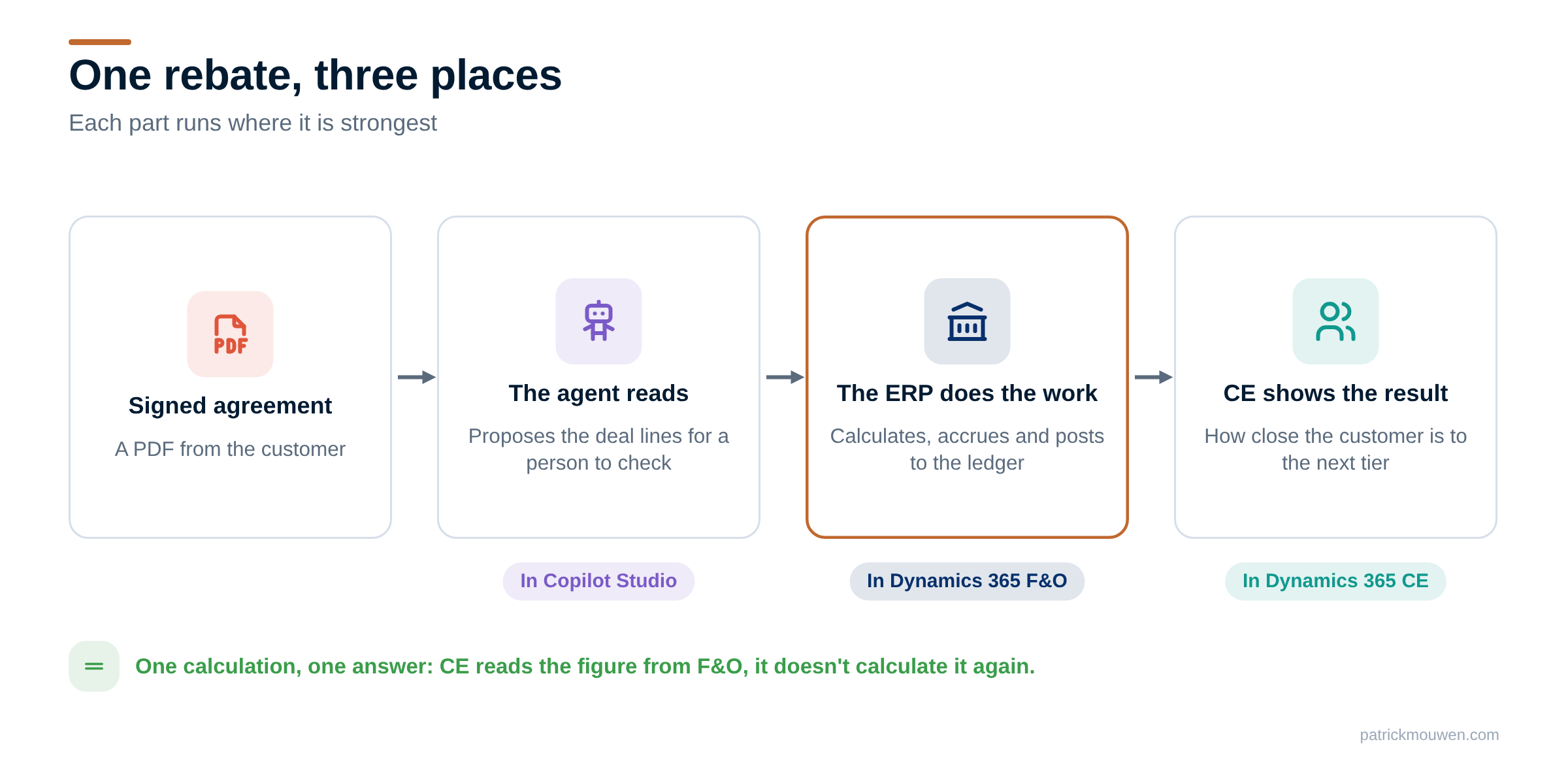
One calculation, one answer. When finance and sales talk about the rebate, they look at the same number.
Your own gaps can follow the same split. Let the agent read and propose. Let the ERP calculate and post. Let CE show the result and support the conversation. Curious which ERP routines agents can already call? My MCP Actions Explorer lists all 50 in the standard code of 10.0.49.
Which gap did you close outside the ERP, and would you put it there again?
Further reading
| Source | Read | What you'll find |
|---|---|---|
| Microsoft | Extensibility home page | Why F&O allows extensions only, and how they hook in |
| Microsoft | Solution layers | How CE solutions stack, and which components merge |
| Microsoft | Use Model Context Protocol for finance and operations apps | How agents reach ERP pages, data and actions |
| Community tool | MCP Actions Explorer | All 50 ERP actions an agent can call in 10.0.49 |
| Blog post | What can an AI agent actually do in Dynamics 365 F&O (V49)? | The three ways agents work with F&O, and what Microsoft ships |